

Yearbook vendor support means phone, email, and chat access to a team that handles technical problems, design questions, and production or fulfillment issues. Before you reach out, gather your login details, school or project ID, sample files, and screenshots of any error. Most vendors answer phone calls immediately during business hours, with email or ticket responses landing same-day to 48 hours out.
TL;DR:
- Support response times vary, with phone support typically immediate during business hours and email responses within one to two days.
- Vendors distinguish between software help, design support, proofing, and fulfillment, each handled by different teams or departments.
- For large programs, requesting a dedicated support representative or advisor helps streamline communication and prevent repeated transfers.
- Self-help resources like knowledge bases and templates are effective for routine questions, but precise information and early testing prevent delays.
- Preparing detailed logs, screenshots, and specific file information before contacting support reduces resolution time and avoids unnecessary back-and-forth.
Table of Contents
- How Do I Contact Yearbook Vendor Support?
- What Kinds of Yearbook Design Help Can You Expect?
- What Does Dedicated Support Look Like for Larger Programs?
- Where Can You Find Self-Help Resources Before Filing a Ticket?
- What Should You Prepare Before Every Support Interaction?
- How TrailMark Yearbooks Handles Support Requests
- When to Call Vendor Support vs. Keep Control In-House
- Get Started With TrailMark Yearbooks
- Sources
- FAQ
How Do I Contact Yearbook Vendor Support?
Match the channel to the urgency. A production deadline that's slipping or a proof that won't load needs a phone call, not an email that sits in a queue. Routine questions about uploading photos or fixing a layout glitch usually fit chat. Anything you'll need a paper trail for, like a billing dispute or a recurring bug, belongs in email or a ticket system so there's a timestamp and a record.
Support centers typically post weekday business hours along with phone numbers and email addresses right on the homepage. Phone support tends to be immediate. Email or ticket-based support usually receives a response within a few business days, depending on the vendor and the season.
Before you contact anyone, have this ready:
- School name and project or account ID
- The specific page numbers affected
- Step-by-step description of what happened
- Browser and operating system you're using
- Screenshots or a short screen recording
- File types involved (JPG, PDF, INDD, PNG)
Skipping this step is the single biggest reason support tickets drag on longer than they should.
What Kinds of Yearbook Design Help Can You Expect?
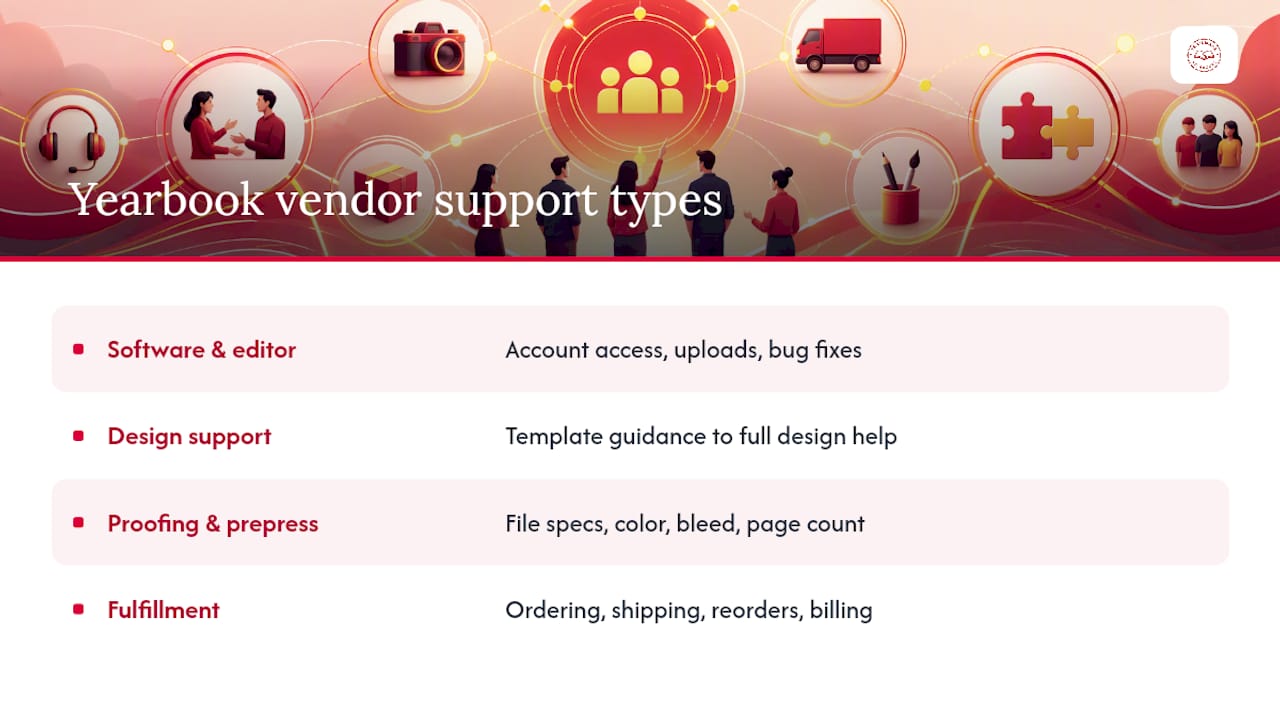
Vendor support splits into four buckets, and knowing which one you're dealing with saves you a wrong-department transfer. Vendors typically separate their own team's responsibilities, like software help and bug reporting, from tasks that stay with the school, such as content decisions and submission deadlines.
Software and editor support covers account access, upload troubles, glitchy editor features, and anything you'd call a bug. This is the vendor's job to fix, not yours to work around.
Design support ranges from basic template guidance to full free design assistance included with your package. Some vendors charge extra for hands-on layout help; others bundle it in. Ask up front which model you're getting.
Proofing and prepress is where vendors check file specs, color accuracy, bleed margins, and total page count before anything goes to print. This step also covers the formal proof approval workflow, which every adviser should understand before their first deadline hits.
Fulfillment handles ordering, shipping, reorders, and any billing or invoice questions after the file leaves your hands. A school guide to yearbook support services breaks these categories down further if you're comparing vendors.
Pro Tip: Ask your vendor which proofing errors they catch automatically (bleed, resolution, page count) versus which ones are on you to review manually, like typos in student names. That one question prevents most last-minute panic.
What Does Dedicated Support Look Like for Larger Programs?
Schools running multiple yearbooks, a district-wide program, or a first-year staff with no institutional memory benefit from dedicated support: a named adviser or customer success contact instead of a general queue. This person learns your school's history and can spot a recurring problem before it becomes a pattern.
Getting there usually means:
- Ask specifically for a dedicated adviser or account contact when you first sign up, not after a problem appears.
- Request a one-on-one demo or screen share rather than a generic group webinar. One-on-one sessions tend to work better for staff onboarding than large group demos aimed at students.
- Ask about recorded webinars you can replay for new staff members mid-year.
- Request consolidated deadlines across multiple titles if you manage more than one publication.
The payoff is a single point of escalation instead of starting over with a new rep every time you call.
Where Can You Find Self-Help Resources Before Filing a Ticket?
Most vendors maintain a knowledge base stocked with step-by-step articles, video tutorials, and downloadable templates in formats like InDesign (INDD) and Canva. Template libraries cut down on layout errors and get students working faster than waiting on a support reply.
Self-help beats a ticket when the issue is common: a formatting question, a "how do I add a border" moment, or confusion about export settings. Save the phone call for anything account-specific or genuinely broken.
A few habits make self-help resources actually useful:
- Follow file specs exactly as listed, down to the pixel dimensions
- Use sample pages from the vendor's template library as a starting reference
- Test your first upload weeks before a deadline, not the night before
Our guide on class page design covers one of the most common trouble spots: stretched or pixelated student photos.
What Should You Prepare Before Every Support Interaction?
A little prep work turns a three-day back-and-forth into a same-day fix.
- Have your login, school name, and project ID open before you dial or type.
- Note exact page numbers and file types involved.
- Write your bug report with clear reproduction steps: what you clicked, what you expected, what happened instead, plus browser and OS.
- Attach a screenshot or short video whenever possible.
- Keep a running log of ticket numbers, rep names, and timestamps in case you need to escalate.
Treat proofing like a paper trail, not a memory exercise. Assign one final approver, version your notes each round, and get a documented sign-off before the file goes to print. Vendors that ask you to treat yearbook production as storytelling can also help with theme cohesion, not just bug fixes, so don't be afraid to ask design questions alongside technical ones.
Pro Tip: Screenshot every approved proof the moment you sign off. If a printing error shows up later, that timestamped image is your fastest path to a reprint instead of an argument.
How TrailMark Yearbooks Handles Support Requests
TrailMark Yearbooks built its support model around one idea: advisers shouldn't lose weeks waiting on answers during a production cycle. Turnaround runs 2 to 3 weeks, and there are no order deadlines forcing you into a rigid calendar. Free design assistance comes standard, and you can build pages in Canva, Adobe InDesign, or TrailMark's own online creator, whichever fits your staff's skill level.
The support approach draws on more than 50 years of combined team experience, with a school-first philosophy behind every response.
- Fast 2 to 3 week production turnaround with no fixed order deadlines
- Free design assistance included, not sold as an add-on
- Flexible design paths: Canva, InDesign, or the online creator
- Requests for samples or production details go through the request a sample page
When to Call Vendor Support vs. Keep Control In-House
Vendor support earns its keep on anything technical: file errors, proofing checks, and hitting a printing deadline without surprises. That's where their expertise actually outpaces yours, and there's no upside to guessing.
Editorial voice, student involvement, and budget sign-off should stay with your team. A vendor can flag a resolution problem, but they shouldn't be deciding your theme or your content. Loop in support early, document every decision in writing, and you'll avoid the scramble that happens when a fixable issue gets discovered two days before print.
— Jace
Get Started With TrailMark Yearbooks
TrailMark Yearbooks offers instant pricing online, a 2 to 3 week turnaround, and design assistance included with every package. There is no signup wall or hidden fee waiting at checkout, which matters when managing a tight school budget.
If you want to see the quality before committing your school's order, request a free sample and get a feel for the paper stock, binding, and print clarity firsthand. Ready to compare packages and pricing? Browse TrailMark's production services and get an instant quote for your school.
Sources
FAQ
How Do You Get Students and Families to Actually Buy Yearbooks?
Promote early and often through school newsletters, social media, and in-class reminders, and highlight specific content like sports teams or clubs students recognize by name. Vendors offering flexible ordering windows without rigid deadlines make it easier to catch late buyers who decide close to the deadline.
What Company Prints Yearbooks for Schools?
Several companies specialize in yearbook printing for elementary, middle, and high schools, including TrailMark Yearbooks, which offers instant online pricing, a 2 to 3 week turnaround, and free design assistance with every order.
How Can You Find Old Yearbooks for Free?
Check with your school's front office or library archive first, since many keep physical copies on file going back decades. Local public libraries and historical societies also sometimes digitize old yearbooks and post them online at no cost.
Can You Get a Hard Copy if Your Yearbook Was Made Digitally?
Most yearbook platforms that start as digital projects still produce printed hard copies as the final product, since that's the core deliverable schools order. Confirm with your vendor's fulfillment team whether reprints or additional physical copies are available after the initial print run ships.