

Supporting yearbook adviser success starts with five decisions made in the first two weeks of the school year, not the last two weeks before the printer deadline. Here is the short list of what to do right now, who does each item, and what it buys you.
Your week-one action list:
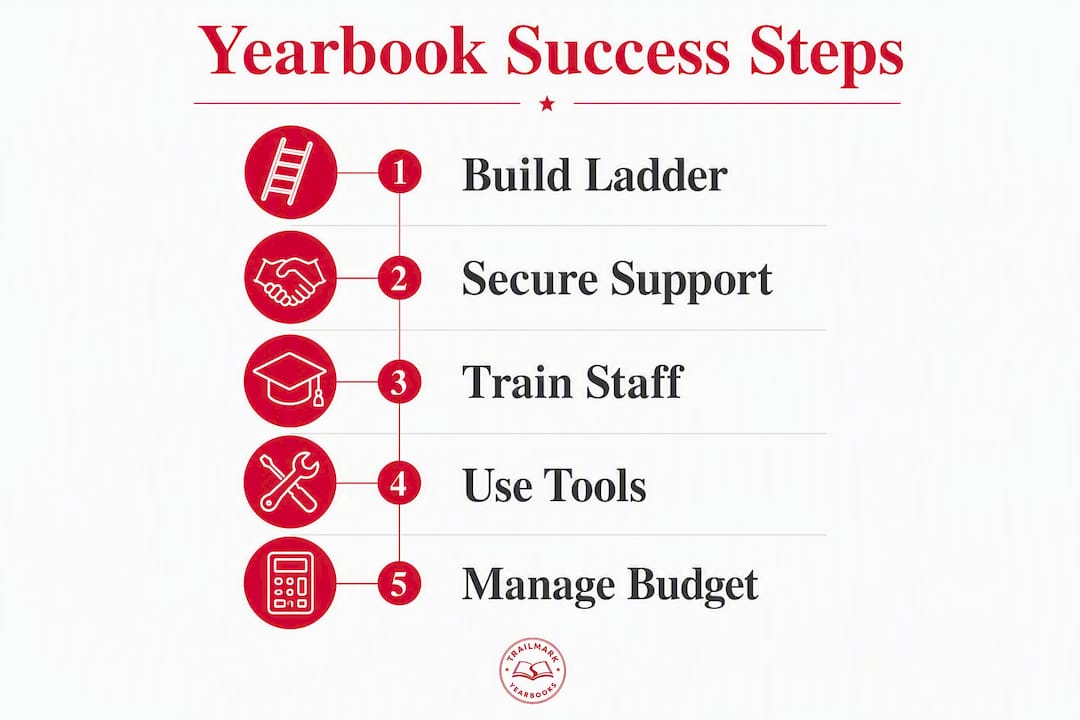
- Create a page ladder (Adviser) — Assign every spread a section, a student owner, and a content type before anything else. This single document prevents coverage gaps all year.
- Set mini-deadlines, not one final deadline (Adviser) — Break production into checkpoints: ads first, portraits next, spread content, then proofing. Each checkpoint has a date.
- Request protected production time (Adviser asks Admin) — A standing weekly block where the room is yours and interruptions are off the table. Even a brief twice-weekly session significantly changes what gets finished.
- Secure a baseline budget (Admin approves, Adviser proposes) — Know your print cost, your ad revenue target, and your contingency before the first sale.
- Assign coverage beats to student leads (Adviser + Editor-in-Chief) — Every student owns specific events, clubs, or grade-level content. No beat, no accountability.
- Recruit and onboard staff early (Adviser) — Use a recruitment checklist before school starts to fill photography, writing, and design roles before gaps appear.
- Download your template kit (Adviser) — The production ladder template, deadline checklist, budget sheet, grading rubric, and sample admin email are all available as downloadable PDFs later in this guide.
That list is the whole game in compressed form. Everything below is the how and the why.
Table of Contents
- How can administrators actively support yearbook advisers?
- How do you build a production ladder with real mini-deadlines?
- What training options actually help yearbook advisers?
- Which design tools keep yearbook production efficient?
- How do you build a yearbook budget that actually works?
- How do you organize a student yearbook team that delivers reliably?
- What templates and downloads should every adviser have ready?
- Key Takeaways
- What experienced advisers wish they had known sooner
- Trailmarkyearbooks makes the production side easier to manage
- Useful resources for yearbook advisers
How can administrators actively support yearbook advisers?
Administrators who understand what a yearbook program actually demands tend to get better results from their advisers. The job spans classroom instruction and business operations simultaneously: teaching layout and caption writing while managing ad sales, vendor timelines, and student conflict. Without structural support from administration, advisers absorb all of that friction alone.
Specific actions administrators can take:
- Classroom visits — A single admin visit to the yearbook room signals to students that the program has institutional weight. It takes 10 minutes and changes the room's culture.
- Protected meeting time — Block a recurring period on the master schedule where the yearbook room is not used for testing, assemblies, or other pullouts.
- Equipment checkout policy — A written policy covering camera loans, laptop assignments, and software licensing removes the grey area that causes equipment loss and deadline slip.
- Budget signoff — Approve a working budget at the start of the year, not mid-production. Late budget approval is one of the most common causes of delayed print orders.
- Advocacy in faculty and board meetings — When administrators mention the yearbook program in public settings, it raises the program's profile and makes fundraising easier.
Sample admin-request email advisers can adapt
Admin-request checklist (copy into your next meeting agenda):
- Protected production time: multiple brief sessions per week
- Budget approved and accessible by [first week of school]
- Equipment checkout policy signed and posted
- Adviser included in relevant faculty communication channels
- One admin classroom visit scheduled per semester
Pro Tip: Frame every admin request around student outcomes and risk mitigation, not personal convenience. "Protected time reduces the chance of a late book, which affects every family who ordered" lands differently than "I need fewer interruptions."
Administrators who want a deeper look at what a formal yearbook policy covers can review school yearbook policy best practices as a starting point for drafting their own.
How do you build a production ladder with real mini-deadlines?
The ladder is the single most important document in a yearbook program. Experienced advisers assign pages and beats in weeks one and two, before any content exists, because the ladder forces every decision about coverage before the year gets busy.
A clear ladder template with assigned beats reduces coverage gaps and keeps staff accountable across the full production cycle. Here is a sample timeline you can copy this week:
- Week 1–2: Build the ladder. Assign every spread a section (academics, clubs, sports, student life, ads, portraits, senior tributes). Assign a student owner to each spread.
- Week 3–4: Sell and close advertising. Ad pages are the first to print and the first to fund everything else. Set a hard ad-close date.
- Week 5–6: Collect portrait photography. Coordinate with the school photographer and set a retake deadline.
- Week 7–10: Produce spread content. Student leads submit first drafts of assigned spreads. Adviser reviews and returns with written feedback.
- Week 11–12: Internal review cycle. Section editors check every spread for caption accuracy, photo quality, and layout consistency.
- Week 13: Senior tributes and closing pages. These are the most time-sensitive because seniors submit their own content.
- Week 14: Final proofread. Adviser and editor-in-chief review every page. No new content after this point.
- Week 15: Submit to printer.
A deadline management checklist that documents each checkpoint and assigns a reviewer to each stage prevents the most common timeline delays. Paste this into your LMS, your staff folder, or a shared Google Drive so every student can see the current status.
Quick checklist for your LMS or staff folder:
- Ladder complete and shared with all staff
- Ad-close date set and communicated to local businesses
- Portrait deadline confirmed with school photographer
- First-draft checkpoints on the calendar for each section
- Review cycle assigned (who reviews what, by when)
- Final proof date locked before printer submission
What training options actually help yearbook advisers?
Most advisers come to the job without formal journalism or design training. The good news is that the most useful professional development tends to be short, specific, and immediately replicable with students.
Workshop and conference types worth your time:
- On-site adviser workshops — A vendor or experienced adviser comes to your school for a half-day session. High value because the content is tailored to your staff's current skill gaps.
- Summer institutes — Multi-day programs that cover design, journalism ethics, photography, and production workflow. The Varsity Yearbook Adviser Workshop is one example of this format.
- Online micro-courses — Platforms like Adobe's own training library and Canva's design school offer free, self-paced modules that advisers can assign directly to students.
- Local journalism educator networks — State-level scholastic press associations often run regional workshops that cost less than national conferences and count toward professional development hours.
The most efficient move after any workshop is to turn what you learned into a 30-minute staff training session. One new technique, one example, one practice exercise. Done weekly, that habit embeds skills across the whole staff faster than any single training event.
To request PD funding, frame the ask the same way you frame admin support requests: connect the training to a measurable outcome. "This workshop will help us reduce late spreads by giving section editors a faster review process" is a fundable request. "I want to learn more about design" is not.
Trailmarkyearbooks provides adviser resource PDFs that function as ready-to-use training materials, covering production workflow, design basics, and deadline management. These are available at no cost and can be used directly in staff meetings.
Which design tools keep yearbook production efficient?
The right tool depends on your staff's skill level, not on what produces the most polished result in theory. A staff of beginners who struggle with Adobe InDesign will miss more deadlines than a staff using Canva confidently.

Flexible design options reduce friction at handoff and speed turnaround. Here is how each tool fits a school setting:
Canva works best for programs with mixed skill levels or limited class time. Templates are fast to set up, the learning curve is short, and collaborative editing lets multiple students work on the same spread simultaneously. The tradeoff is less typographic control for complex layouts.
Adobe InDesign is the professional standard for a reason: precise grid control, master pages, and paragraph styles make large-book production consistent and repeatable. It rewards programs with a dedicated design editor who has time to learn the software properly. InDesign files are also the easiest to hand off to a printer without reformatting.
Online yearbook creators (including Trailmarkyearbooks's own platform) are the right call when simplicity and speed matter more than design flexibility. They are particularly strong for elementary schools or programs running yearbook as an extracurricular with limited supervision time.
Equipment and file management checklist:
- Camera checkout log with student name, date out, and date returned
- Consistent file naming:
YYYY_Section_SpreadNumber_StudentLastName - Weekly backup to a shared drive (Google Drive or OneDrive)
- Student accounts set up with role-based permissions (editors vs. contributors)
- Master files stored in a folder only the adviser and editor-in-chief can edit
Pro Tip: Keep a "version history" folder inside your shared drive and save a dated copy of the full layout file every Friday. When a student accidentally overwrites a spread, you lose one week of work at most, not the whole section.
Common timeline delays trace back to lost files and unclear equipment policies more often than to design skill gaps. The checklist above prevents most of them.
How do you build a yearbook budget that actually works?
A yearbook budget has two sides: what you spend and what you bring in. Most programs that run into financial trouble have one of those sides undefined at the start of the year.
Sample budget structure:
- Production costs — Print cost per book multiplied by estimated order quantity. Get an all-inclusive quote that covers shipping before you set your sale price.
- Advertising revenue — Set a target based on last year's ad sales or a conservative estimate of local business interest. This is your primary subsidy for keeping student prices accessible.
- Yearbook sales revenue — Tiered pricing (early-bird, standard, late) with a target sell-through rate.
- Supplies — Photography supplies, printer ink, paper for proofing, and any software subscriptions not covered by the school.
- Contingency — Reserve a contingency fund of sufficient size for reprints, corrections, or unexpected fees.
Fundraising and sales tactics that work in schools:
- Business ad sales — Local businesses pay for a quarter-page, half-page, or full-page ad. A student sales lead handles outreach with a rate card and a deadline.
- Senior tributes — Families pay to place a personal message and photo on a dedicated page. Price these at a premium; demand is consistent.
- Early-bird pricing — Open sales in September at a lower price point. This generates cash flow early and reduces the number of last-minute orders.
- Bundled offers — Combine a yearbook with a personalization kit (name stamp, icons) at a slight discount. Increases average order value.
- School event promotion — Set up a sales table at back-to-school night, fall sports events, and parent-teacher conferences. In-person sales consistently outperform email-only campaigns.
Ad revenue that exceeds your target can directly subsidize student prices, making the book accessible to families who might otherwise skip it. Assign a student sales lead to track every ad contract, invoice, and payment in a shared spreadsheet so nothing falls through.
How do you organize a student yearbook team that delivers reliably?
The staff structure determines whether the adviser is managing production or drowning in it. Assigning specific beats to students increases both accountability and the authenticity of coverage.
Core staff roles and what each one owns:
- Editor-in-Chief — Final approval on all spreads, manages section editors, communicates directly with the adviser on timeline status.
- Section editors — Own a defined section (sports, clubs, academics, student life). Responsible for their section's first draft, photo selection, and caption accuracy.
- Photographers — Assigned to specific events on the coverage calendar. Responsible for submitting edited photos by the section deadline.
- Designers — Build spreads in the chosen design tool. Work from the section editor's content and the adviser's layout guidelines.
- Sales lead — Manages ad outreach, tracks contracts, follows up on payments, and reports weekly to the adviser.
Grading rubric advisers can use immediately
A simple rubric with four categories keeps feedback consistent and defensible:
| Category | 4 (Exceeds) | 3 (Meets) | 2 (Approaching) | 1 (Below) |
|---|---|---|---|---|
| Photo quality | Sharp, well-composed, relevant | Acceptable quality, on-topic | Blurry or loosely relevant | Missing or off-topic |
| Caption accuracy | Names, dates, context all correct | Minor error, self-correctable | Missing key detail | Inaccurate or absent |
| Layout clarity | Clean grid, readable type | Minor spacing issues | Crowded or inconsistent | Unreadable |
| Deadline adherence | Submitted early | On time | One day late | More than one day late |
For chronic missed deadlines, a three-step process works: a private conversation first, a written warning with a specific next deadline, and then a role reassignment if the pattern continues. Most students respond to the private conversation alone.
Pro Tip: Delegate ad tracking and order management entirely to a student sales lead. When advisers handle those tasks themselves, they lose the instructional time that keeps spread quality high. Adviser-delegated student leads for production tracking free the adviser to focus on teaching and quality control.
What templates and downloads should every adviser have ready?
The following assets cover the full production cycle and are available through Trailmarkyearbooks's adviser resource hub.
Template inventory:
- Deadline checklist — A week-by-week checklist covering every production stage from ad-close to printer submission. Copy it into Google Calendar or your LMS.
How to use these in a single semester:
Week one: fill in the ladder template and share it with staff. Week two: open the budget sheet and enter your print quote and ad revenue target. Week three: distribute the deadline checklist to all section editors and block every checkpoint on the shared calendar. Mid-semester: use the rubric for every spread review. Final week: send the admin email template to request end-of-year support for next year's program.
All of these are available as downloadable adviser PDFs from Trailmarkyearbooks. The adviser resource hub also includes blog posts, production guides, and sample yearbooks for programs evaluating print quality and binding options.
Key Takeaways
A yearbook program succeeds when the adviser has a ladder, protected time, a working budget, and a student team with clearly assigned roles before production begins.
| Point | Details |
|---|---|
| Build the ladder in week one | Assign every spread a student owner and content type before any content exists. |
| Mini-deadlines beat one final deadline | Break production into checkpoints: ads, portraits, spread content, proofing, and final review. |
| Admin support requires a specific ask | Use the sample email and checklist to request protected time, budget approval, and an equipment policy. |
| Match design tools to staff skill level | Canva, Adobe InDesign, and online creators each fit different programs; flexibility at handoff speeds turnaround. |
| Trailmarkyearbooks provides ready-to-use support | Fast 2–3 week turnarounds, Canva and InDesign file acceptance, and downloadable adviser PDFs reduce production stress. |
What experienced advisers wish they had known sooner
The conventional wisdom about yearbook advising focuses on design and journalism skills. Those matter, but they are rarely what separates programs that finish on time from programs that don't.
The real divide is structural. Programs that struggle tend to have one person, the adviser, holding every thread: tracking ad payments, chasing photo submissions, managing the printer relationship, grading spreads, and covering the curriculum. Programs that run well have distributed that load across student leads who own specific functions and an administration that has formally acknowledged the program's operational complexity.
The ladder is the mechanism that makes distribution possible. Once every spread has a named owner and a deadline, the adviser's job shifts from doing to reviewing. That shift is the whole game.
One habit that experienced advisers mention consistently: they treat the first two weeks of school as the most important production weeks of the year, even though no content exists yet. The decisions made in those two weeks, who owns what, when things are due, how ads are priced, determine whether the final month is a controlled sprint or a crisis.

On staff morale: students stay engaged when they feel ownership, not just assignment. The difference is whether they chose their beat or were handed it. Letting students claim sections during a structured first-week meeting, rather than assigning them by default, produces noticeably stronger commitment through the year.
Trailmarkyearbooks makes the production side easier to manage
Advisers who have the strategy down still need a printer that does not create new problems. Trailmarkyearbooks is built specifically for school programs: all-inclusive pricing with no hidden fees, a 2–3 week turnaround, and no order deadlines that force you to commit before your sales window closes.
The design flexibility is the part advisers notice most. Trailmarkyearbooks accepts Canva files, Adobe InDesign files, and files built in its own online creator, so your staff works in whatever tool fits their skill level without reformatting for handoff. Optional hands-on design support is available for programs that want a dedicated adviser to guide production from layout to print. Downloadable adviser PDFs, production checklists, and sample books are available at no cost for programs that are still evaluating options.
Request a sample book to review paper stock, binding, and print quality before you commit. Or visit the production services page to get instant all-inclusive pricing for your school, no signup required.
Useful resources for yearbook advisers
- Yearbook Ladder Planning Steps: Adviser's Guide — Step-by-step ladder instructions and a template for first-week planning
- Yearbook Deadline Management Checklist for Advisers — A practical checklist to copy into your LMS or shared calendar
- School Yearbook Policy Best Practices for Advisers — Equipment policies, approval workflows, and admin-facing language
- Yearbook Adviser Responsibilities Explained for Educators — Full task breakdown for advisers and delegation guidance
- Getting Staff Buy-In for Yearbooks: A Practical Guide — Beat assignment strategies and team accountability exercises
- Common Yearbook Timeline Delays: Adviser's Fix-It Guide — Troubleshooting production delays with equipment and file fixes
- Why Flexible Yearbook Design Tools Matter for Advisers — Canva vs. InDesign vs. online creators in a school setting
- Trailmarkyearbooks Adviser Resources PDFs — Direct downloads for templates, checklists, and production guides
- Trailmarkyearbooks Adviser Resource Hub — Central hub for all adviser tools, blog posts, and sample requests