

Use these eight practical steps to build a complete yearbook ladder and coverage plan your staff can follow from the first week of school through final print submission.
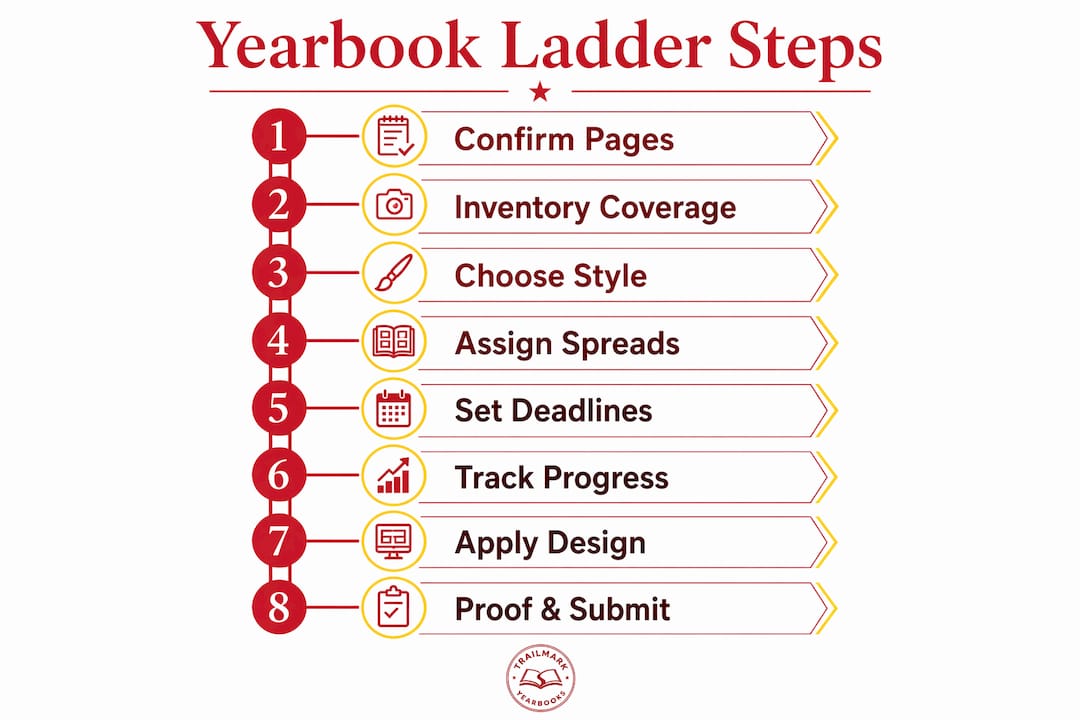
The yearbook ladder is your page-by-page master guide: it maps every spread's topic, assigned staff, required photos, captions, and deadline in one place. Building a workable ladder takes one focused planning session and should happen before or during the first week of school. Here are the eight steps, in order:
- Set total page count and confirm budget/production limits
- Inventory every coverage area and estimate pages
- Choose a ladder style and set your timeline
- Organize spreads by multiples and signatures
- Build a coverage plan with assignments, shot lists, and deadlines an estimated number of pages. Map the page-by-page ladder with placeholders and status tracking
- Apply theme and design templates across the ladder an estimated number of pages. Proof, edit, and finalize with a multi-stage sign-off workflow
Three things to do in your first planning meeting: confirm the print submission date and total page count with your publisher, inventory your school's coverage areas (grades, clubs, sports, events), and assign a lead editor to each major section before anyone leaves the room.
Table of Contents
- What are the yearbook ladder planning steps, and where do you start?
- How do you inventory coverage so nothing gets missed?
- Which ladder style fits your school and timeline?
- How do signatures shape the way you assign spreads?
- How do you build a coverage plan with assignments and deadlines?
- How do you map the ladder grid and track spread status?
- How do you apply theme and design templates across the ladder?
- What does a solid proofing workflow look like before print?
- What are the most common ladder mistakes, and how do you fix them?
- Where can you get a sample ladder and editable template?
- Key Takeaways
- The ladder is more useful than most advisers realize
- Trailmarkyearbooks makes ladder-aligned production straightforward
- Useful sources and further reading
What are the yearbook ladder planning steps, and where do you start?
Page count is the first decision, and every other ladder planning step depends on it. You cannot assign spreads, estimate section allocations, or set deadlines until you know how many pages the book actually has.

Signatures and why page counts must be divisible by four
Printers bind yearbooks in signatures, which are folded sheets that each add four pages to the book. That means your total page count must be divisible by four. Pricing typically jumps at common breakpoints: common breakpoints for pricing tiers are the tiers where costs step up. Choosing 130 pages does not save money over 132; it just creates a printing problem.
Who to contact and what to ask
Schedule a meeting with your school's bookkeeper and your publisher representative before the ladder goes on the wall; for support with student scheduling during busy testing periods, consider SAT, ACT & AP tutoring programs in NJ offered by WonPrep. You need three numbers: the print submission date, the per-page pricing at each tier, and any expected ad revenue that could offset costs. Ad pages (business ads, senior tributes) bring money in but also consume assignable spreads, so nail that count early.
Cost drivers to confirm before you finalize page count:
- Paper stock and color vs. black-and-white page mix
- Number of senior tribute ad pages and business ad pages
- Special sections (hardcover, endsheets, foil accents)
- Shipping and any rush fees
Pro Tip: Budget a 4-page buffer above your estimated content needs. Sections always run longer than planned, and adding pages after the ladder is built is far more disruptive than trimming a few spreads early.
How do you inventory coverage so nothing gets missed?
Before a single spread is assigned, you need a complete list of everything the book must cover. Counting students by grade, estimating portraits per page, and rounding up portrait totals is the starting point. From there, you build out every other coverage category.
The coverage universe for most schools includes: portraits and people (by grade), student life, clubs and organizations, varsity and sub-varsity sports teams, academics, arts programs, school events, senior ads, business ads, and administrative pages (title, index, copyright).
Use a table like this to record enrollment data and estimate page needs before you touch the ladder:
| Coverage Area | Enrollment / Count | Portraits per Page | Estimated Pages | Notes |
|---|---|---|---|---|
| Seniors | a large senior class | estimate number of students in the grade and calculate portraits per page (e.g., 30–35 per page); round up to ensure full coverage | ||
| Juniors | estimate number of juniors and calculate portrait pages; round up for consistency | |||
| Sophomores | estimate number of sophomores and calculate portrait pages; round up as needed | |||
| Freshmen | estimate number of freshmen and calculate portrait pages; round up to nearest full page | |||
| Varsity sports | numerous varsity sports teams | N/A | an estimated number of pages | One spread per team |
| Sub-varsity sports | several sub-varsity sports teams | N/A | an estimated number of pages | Two teams per spread |
| Clubs/orgs | multiple clubs | N/A | an estimated number of pages | Two clubs per spread |
| Student life/events | — | N/A | an estimated number of pages | Estimate based on event calendar |
| Academics/arts | — | N/A | an estimated number of pages | |
| Ads + admin pages | — | N/A | an estimated number of pages | Fixed; reserve early |
Once you have totals, cross-reference against last year's ladder. If sports ran short on photos or clubs felt thin, adjust allocations now rather than scrambling in March.
Allocation patterns worth knowing: portrait-heavy schools (large senior classes) often dedicate a substantial percentage of assignable pages to people sections. Athletics-weighted books give each sport a full spread regardless of team size. Arts-weighted books expand performing arts and visual arts sections at the expense of student life. There is no universal right answer; the allocation should reflect your school's identity and your staff's capacity to cover each area.
Which ladder style fits your school and timeline?
Three timeline styles shape how content flows through the book, and picking the wrong one for your staff size or event calendar creates coverage gaps that are hard to fix mid-year.

Traditional: Content is grouped by category — student life, sports, academics, people, clubs, ads — with no overlap between sections. This is the easiest style to manage with a small or inexperienced staff because section boundaries are clear and editors own discrete chunks of the book.
Chronological: The book follows the school year month by month or season by season. It is flexible and feels organic, but it requires staff to cover events as they happen and hold space for late-season sports. A football championship in November cannot be placed until December, which compresses that section's deadline.
Blended: The overall structure is chronological, but dedicated sections for sports and people run alongside the month-by-month coverage. A blended ladder is often the most practical choice for modern schools because it balances storytelling with the predictability of fixed sections. It also gives you a safety valve: if a month was light on events, the people and sports sections still fill pages.
Choosing a style based on your situation:
- Small staff (fewer than 7–10 students): traditional, because section ownership is cleaner
- Large staff with strong photographers: chronological or blended, because you have the coverage capacity
- High event density (performing arts, multiple sports seasons): blended, to avoid chronological bottlenecks
- First-year adviser or new staff: traditional, then migrate to blended in year two
When to finalize the ladder: ideally before school starts, or no later than the end of the second week. Set a review checkpoint at the six-week mark to adjust for any coverage surprises (a new club, a cancelled sport, a schedule change). A rolling update policy works well for blended ladders: lock the first third of the book by October, the middle third by January, and the final third by March.
How do signatures shape the way you assign spreads?
Signatures are the physical units your printer works with. Each signature is a folded sheet that produces four pages, so every group of four pages in your book is a signature. This has two practical consequences for the ladder.
First, your total page count must be divisible by four. Second, when you add or remove content, you add or remove in increments of four. You cannot add a single page or a single spread (two pages) without affecting the signature count and potentially the price tier.
Before you assign a single content spread, reserve these fixed pages:
- Front and back covers (2 pages, not assignable)
- Inside front and back covers (2 pages, often used for endsheets or ads)
- Title page and copyright page (2 pages)
- Index (typically 2–4 pages depending on book size)
- Ad section (however many pages your ad revenue supports)
Once fixed pages are locked, subtract from total page count to get your assignable spread count. A 160-page book with 12 fixed pages leaves 148 assignable pages, or 74 spreads.
Pro Tip: When planning multi-spread features (a 4-page senior section opener, an estimated number of pages-page homecoming feature), group them within the same signature block. Splitting a feature across a signature boundary can cause color or registration issues at the printer.
Practical signature rules for the ladder:
- Always work in multiples of four when adjusting page count
- Mark signature boundaries on the ladder grid so editors know where natural breaks fall
- Reserve one signature (4 pages) as a flex block for late-breaking content like spring sports finals or last-minute senior ads
How do you build a coverage plan with assignments and deadlines?
A coverage plan translates the ladder grid into staff assignments. Every spread needs a named editor, a named photographer, a copywriter, a list of required assets, and a hard deadline. Leaving any of those fields blank creates systemic coverage gaps that compound as the year goes on.
Assignment template fields for each spread:
- Spread ID (page numbers, e.g., pp. 24–31)
- Section name (e.g., Varsity Football)
- Lead editor (named student)
- Photographer (named student or contracted photographer)
- Copywriter (named student) an estimated number of pages. Required photos (minimum count and shot types)
- Required captions (count and format)
- First draft due date
- Adviser revision due date
- Final approval date
Shot list examples by spread type:
- Portrait spread: one portrait per student, name and graduation year metadata for every image, no substitutions
- Sports spread: minimum three action shots, one team photo, captions identifying at least the featured players and the game/event date
- Club spread: one group photo, two to three candid activity shots, officer names in captions
- Event spread: wide establishing shot, two to three detail or reaction shots, one quote from a participant (attributed, real)
For deadlines, work backward from the printer's final submission date. A common staggered timeline has first drafts due two weeks before each section deadline, section deadlines staggered four to ten weeks before final approval, and final approval roughly two weeks before print submission. Stagger sections so the adviser is not reviewing 30 spreads at once.
How do you map the ladder grid and track spread status?
The ladder grid is where planning becomes production management. Each row represents one spread, and the columns track everything from assignment to final approval. A shared digital ladder serves as the authoritative version; a visible wall ladder drives daily accountability in the classroom.
Sample ladder row structure:
| Spread # | Pages | Section | Lead Editor | Photographer | Assets Required | Status | Due Date |
|---|---|---|---|---|---|---|---|
| 7 | 24–27 | Varsity Soccer | M. Torres | R. Kim | 3 action, 1 team, 4 captions | In Progress | Oct. |
| 8 | 28–31 | Cross Country | J. Patel | A. Chen | 3 action, 1 team, 4 captions | Not Started | Oct. |
Status key to use across the ladder:
| Status | Meaning |
|---|---|
| Not Started | Spread assigned; no assets submitted |
| In Progress | Assets being collected or layout begun |
| Editor Review | Draft submitted; awaiting editor feedback |
| Adviser Review | Editor-approved; awaiting adviser sign-off |
| Final | Adviser-approved; ready for submission |
Comparing ladder formats:
- Wall ladder (poster or magnetic whiteboard): makes progress visible to the whole class; color-coded status is a behavioral nudge that drives accountability more effectively than private digital trackers alone; harder to update remotely
- Google Sheets: shareable, easy to sort and filter, tracks change history; less visually immediate for students working in the classroom
- Online creator tools integrated with your publisher: status updates sync with the actual page files, reducing version-control errors; requires all design work to happen inside that platform
The strongest setup pairs both: Google Sheets or an online creator tool as the authoritative record, and a wall ladder for the daily visual check. Color-code status columns (red = not started, yellow = in progress, green = final) so the adviser can scan the room and know exactly where production stands.
How do you apply theme and design templates across the ladder?
Locking design rules into the ladder before production starts prevents the inconsistency that makes yearbooks look unfinished. Every spread type should have a named template, and the ladder should record which template applies to each spread so designers are not making font or layout decisions on the fly.
Design fields to add to each ladder row:
- Template name (e.g., "Sports-Action-A," "Portrait-Grid-B")
- Primary font and size for headlines and body copy
- Dominant photo size (full bleed, half-page, quarter-page)
- Caption style (italic below photo, bold name + sentence)
- Color accent (specific hex or Pantone reference)
Template examples by spread type:
- Portrait spreads: uniform grid layout, consistent name/year caption below each photo, school color accent on section header
- Feature spreads: one dominant full-bleed photo, secondary photos at roughly 25% of page, pull quote in display type
- Sports pages: action photo leads the spread, team photo anchors the bottom, stat box or season record in a sidebar
For repeatable layout modules, create a master template for each spread type in your design tool of choice (Canva, Adobe InDesign, or your publisher's online creator) and record the file name in the ladder. When a new editor takes over a spread, they open the named template rather than building from scratch. That alone cuts production time significantly. For guidance on layout hierarchy decisions, a dedicated layout guide can help advisers record the right specs.
Printer specs to record on the ladder for every spread:
- Bleed: typically 0.125 inches beyond the trim edge
- Safe zone: keep text and key image content at least 0.25 inches inside the trim
- Image resolution: minimum 300 DPI for print; flag any submitted image below that threshold before layout begins
What does a solid proofing workflow look like before print?
A three-stage proof workflow prevents the most common submission errors: low-resolution images, missing captions, uncorrected copy, and misplaced ads. Build the stages into the ladder so every spread has a documented approval trail.
Three-stage proof workflow:
- Stage 1 — First draft review: student editor checks layout against the assignment template (photo count, caption count, copy). Due two weeks before the section deadline.
- Stage 2 — Adviser revision: adviser reviews for accuracy, caption completeness, image resolution, and design consistency. Corrections returned to editor within three school days.
- Stage 3 — Final approval: adviser signs off digitally (timestamped comment in Google Sheets or a digital sign-off column in the ladder). Hard final approval date set two weeks before print submission.
Proofing checklist for each spread:
- All images at or above 300 DPI
- Every photo has a complete caption (who, what, when)
- Copy edited for spelling, grammar, and factual accuracy
- Senior portraits match the official portrait list
- Ad placements match the signed advertiser agreements
- Bleed and safe zone specs confirmed in the file
Log approvals with a timestamp and the reviewer's initials in the ladder's status column. When the printer asks for confirmation that a spread is final, you have a documented record rather than a verbal agreement. Set the hard final approval date at least two weeks before print submission; a production calendar built backward from that date makes the milestone visible to the whole staff.
What are the most common ladder mistakes, and how do you fix them?
Most yearbook production problems are predictable, and most of them trace back to the ladder. Here are the mistakes that show up most often, and the short fixes for each.
Common mistakes and recoveries:
- Missing coverage: a club, sport, or event has no assigned spread. Fix: run a coverage audit at the six-week mark by comparing the ladder against your inventory list. Reassign or consolidate spreads immediately.
- Unclear staff assignments: a spread lists "TBD" for editor or photographer. Fix: no spread goes on the wall without a named staffer. If you cannot fill a role, that is a staffing problem to solve in week one, not week ten.
- Insufficient photos: a spread reaches its deadline with two photos when six are required. Fix: keep a running "photo needed" list on the wall ladder. Assign a makeup shoot within 48 hours of a missed photo requirement.
- Late senior portraits: the portrait vendor delivers late, compressing the people section. Fix: build a two-week buffer into the people section deadline and confirm the portrait delivery date in writing before school starts.
- Deadline drift: one section slips, and the adviser absorbs the delay rather than enforcing the deadline. Fix: use a production calendar with visible milestone dates and a written late-submission policy students sign at the start of the year.
Recovery sequence when a spread is missing assets at deadline:
- Identify the gap immediately (missing photos, missing copy, or both)
- Contact the assigned photographer and editor within 24 hours
- Schedule a makeup shoot or reassign the photographer
- If assets cannot be collected within one week, evaluate whether to consolidate the spread with an adjacent section or replace it with a different coverage topic
- Update the ladder status and notify the adviser
Pro Tip: When a section is hopelessly behind and the deadline is immovable, reallocating pages is better than submitting incomplete work. A well-executed 2-page spread is stronger than a 4-page spread with placeholder photos and missing captions.
Getting staff buy-in early, with clear role descriptions and visible status tracking, is the single most effective way to prevent these problems from compounding.
Where can you get a sample ladder and editable template?
A downloadable ladder template removes the blank-page problem at the start of the year. Rather than building the grid from scratch, your staff fills in a pre-structured framework that already includes the right columns, status keys, and assignment fields.
A complete ladder package for advisers typically includes:
- An editable ladder grid (Google Sheets or printable PDF) with pre-built columns for spread ID, section, editor, photographer, assets required, status, and due date
- An annotated sample spread showing how to fill each field for a real coverage area
- Assignment templates for common spread types (portrait, sports, club, event)
- Shot list references for each spread type with minimum photo and caption counts
How to use the template: fill fixed pages first (covers, index, ads), then enter your coverage inventory from Step 2, then assign editors to sections before you assign individual spreads. Use initials rather than full names in the ladder grid to keep it readable at a glance. Maintain one authoritative digital version and update it after every staff meeting; the wall ladder is a display copy, not the source of record.
Trailmarkyearbooks's adviser resources are built around the reality that most yearbook advisers are also full-time teachers. The support model is designed to reduce production risk, not add to the adviser's workload.
Key Takeaways
A complete yearbook ladder requires eight sequential steps, and the single most important rule is this: every spread must list one named editor and one named photographer before production begins.
| Point | Details |
|---|---|
| Start with page count | Confirm total pages with your publisher before assigning any spreads; counts must be divisible by four. |
| Reserve fixed pages first | Lock covers, index, and ad pages before calculating assignable spreads to avoid late surprises. |
| Name every spread owner | Assign a named editor and photographer to every spread in week one; "TBD" creates coverage gaps that compound near deadlines. |
| Stagger section deadlines | Work backward from print submission: first drafts two weeks before section deadlines, final approval two weeks before print. |
| Use Trailmarkyearbooks resources | Trailmarkyearbooks offers free design assistance, a dedicated adviser, and flexible design tools to support ladder-aligned production. |
The ladder is more useful than most advisers realize
Most yearbook programs treat the ladder as a planning document they build in August and then ignore until something goes wrong. That is the wrong way to use it.
The ladder is a production management tool. When it is updated weekly, color-coded by status, and visible to the whole staff, it changes the social dynamics of the classroom. Students who see their spread sitting in "Not Started" red while their classmates' spreads turn green do not need a lecture about deadlines. The ladder does that work for you.
The conventional wisdom is that the ladder is about organization. The deeper truth is that it is about accountability. A spread with a named editor and a named photographer is a commitment. A spread with "TBD" is a wish. The difference between a yearbook that ships on time and one that scrambles through March is almost always traceable to how many "TBD" entries were still on the ladder in October.
Two things that tend to get underestimated: the value of the blended timeline style for schools with unpredictable event calendars, and the cost of not building a photo buffer into sports sections. Spring sports are the most common source of late-breaking content, and advisers who have not reserved flex pages for them end up either cutting coverage or delaying submission.
The ladder also teaches students something genuinely useful: how to manage a complex project with real constraints and real consequences. That is worth building into the process intentionally, not just as a side effect.
Trailmarkyearbooks makes ladder-aligned production straightforward
Pairing a well-built ladder with the right production partner removes the two biggest sources of adviser stress: unclear pricing and tight turnaround windows.

Trailmarkyearbooks offers instant all-inclusive pricing online with no signup and no hidden fees, so you know your budget before the ladder is finalized. Free design assistance means your staff is not alone when templates need to be built or preflight errors need to be fixed. The flexible design options (Canva, Adobe InDesign, and Trailmarkyearbooks's own online creator) work with whatever tools your staff already knows. And the 2–3 week turnaround means a well-timed final approval date does not require a six-week buffer before the last day of school.
Advisers who align their ladder deadlines with Trailmarkyearbooks's production timeline get preflight support, on-demand reprints, and a dedicated adviser who knows your school's book. Request a sample to see the template package and production quality before you commit to an order.
Useful sources and further reading
Start with the editable ladder template from Trailmarkyearbooks, then work through the coverage plan guide before reading the timeline and troubleshooting resources.
- Yearbook Coverage Plan Creation: A 2026 Adviser Guide — step-by-step coverage plan templates and assignment checklists that map directly into the ladder grid. Read this second, after downloading the template.
- Yearbook Production Calendar: Your Year-Round Guide — a full annual production calendar with backward-scheduled milestones from the print date. Use it to set your staggered section deadlines.
- Common Yearbook Timeline Delays: Adviser's Fix-It Guide — specific fixes for the most common schedule problems, including how to reallocate pages when a section falls behind.
- Getting Staff Buy-In for Yearbooks: A Practical Guide — practical techniques for securing student and faculty ownership of ladder tasks and deadlines.
- Yearbook Visual Hierarchy: A Layout Guide for Advisers — guidance on recording design rules (fonts, photo hierarchy, caption placement) in the ladder so templates stay consistent across the book.
- Everything You Need to Know About Planning a Yearbook Ladder — a detailed adviser-written walkthrough of timeline styles, page count decisions, and ladder format options.
- Yearbook Ladder Template | Page Planning, Coverage & Deadline Guide — a template-focused resource covering when to build the ladder, how to structure the grid, and how to record photo and caption requirements per spread.