

Most yearbook advisers assume the process takes months. That assumption is expensive. Traditional yearbook creation can stretch from 3 to 6 months, yet some online tools produce a finished yearbook in under 3 minutes. The gap between those two realities is exactly what yearbook online creator tools explained as a category are designed to close. This article walks you through what these tools are, how they work, how the leading platforms compare, and how to pick the one that fits your school. No fluff, no vague promises. Just what you actually need to know.
Table of Contents
- Understanding how online yearbook creator tools work
- Comparing key online yearbook tools for schools
- Time-saving strategies and workflow tips for efficient yearbook creation
- Common pitfalls with online yearbook tools and how to avoid them
- Choosing the right online yearbook creator tool for your school
- Why embracing automation is the future of school yearbooks
- Simplify your school's yearbook creation with TrailMark Yearbooks
- Frequently asked questions
Key Takeaways
| Point | Details |
|---|---|
| Drastically reduced time | Modern online tools can create yearbooks in minutes compared to months with traditional methods. |
| Types of online tools | Options range from manual template editors to automated social media import platforms and collaborative school solutions. |
| Workflow structuring | Breaking yearbook production into stages and inviting collaboration optimizes efficiency and reduces stress. |
| Avoid metadata pitfalls | Proper planning and metadata standardization prevent organizational errors in auto-imported yearbooks. |
| Choose tools by school needs | School size, timeline, and staffing influence the best online yearbook tool choice. |
Understanding how online yearbook creator tools work
Online yearbook creator tools are exactly what the name says: software you run in a browser to build, design, and order a printed yearbook without installing anything on your computer. Browser-based platforms let you upload or import photos, arrange content into a yearbook format, and send files to print without touching traditional desktop publishing software. Think of them as the difference between baking bread from scratch versus using a bread machine. Both produce bread. One requires far less active skill and time.
There are three main types of tools you will encounter:
- Template-based editors: You select a layout theme, drop in photos and text, and adjust colors. These give you creative control with guardrails. Tools in this category are ideal for schools that want a personalized look without hiring a designer.
- Cloud collaboration platforms: Multiple editors log in from different devices, claim sections, upload content, and work in parallel. These are built specifically for school yearbook workflows where one adviser cannot do everything alone.
- Automated social media importers: The tool pulls content from connected accounts, organizes it chronologically, and builds a draft automatically. These are fastest but require the most curation judgment.
Understanding which category a tool belongs to saves you from choosing the wrong one for your situation. A solo adviser running a small elementary school yearbook has completely different needs than a team of students producing a 200-page high school book.
One more thing worth knowing early: most of these platforms store everything in the cloud. That means no lost files when a student's laptop crashes in March. The yearbook creation stages from photo collection through final review all happen in one shared space, accessible from any device.
Comparing key online yearbook tools for schools
With a clear understanding of tool types, let's compare how leading platforms cater to school yearbook needs differently.
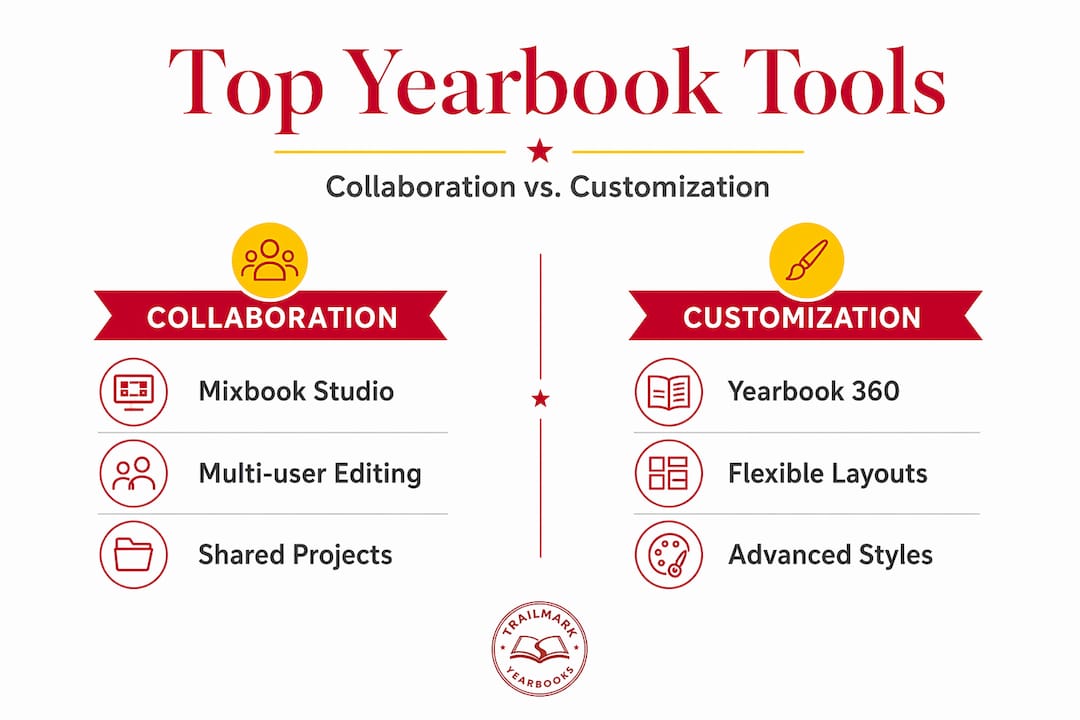
| Platform | Best for | Collaboration | Turnaround | Design control |
|---|---|---|---|---|
| Mixbook Studio | Mid-sized schools | Yes, invite-based | Two weeks or less | High |
| Yearbook 360 | Large schools | Yes, approval workflow | Varies | Medium |
| Shutterfly | Small groups | Limited | Standard shipping | Medium |
| Auto-import tools | Solo advisers, small schools | Minimal | Under 3 minutes | Low |
Mixbook is worth highlighting because it threads the needle between speed and customization. Its platform includes collaboration tools, customizable templates, and a print turnaround that competes with most school calendars. You can invite teachers, parents, and volunteers as contributors, which takes significant workload off the primary adviser. For a yearbook platform overview, it checks most boxes for mid-sized schools.
Yearbook 360 takes a different approach. It is purpose-built for schools, with cloud-based management designed to coordinate staff uploads and community photo submissions through a formal approval workflow. This matters for high schools where 50 different people might be submitting content. Without an approval layer, pages become chaotic quickly.
Shutterfly is the most accessible entry point for advisers who are new to online tools. Drag-and-drop templates handle most of the layout decisions, and bulk orders typically accommodate groups of 10 or more. The trade-off is less creative flexibility compared to Mixbook, and the platform is less tailored to the specific needs of school yearbooks.
Here is a quick summary of what distinguishes the top options:
- Mixbook: Best balance of design freedom and collaboration for most schools
- Yearbook 360: Best for large teams managing high-volume content submissions
- Shutterfly: Best for first-time advisers or small programs needing simplicity
- Automated importers: Best when speed is the only priority and curation is manageable
Pro Tip: Request a free trial or sample project from any platform before committing. Running a test section with real photos from your school will reveal usability issues that no feature list can predict. See yearbook design examples to understand what finished quality looks like before you decide.
Time-saving strategies and workflow tips for efficient yearbook creation
Beyond platform choice, effective strategies and workflow structuring are key to successful, timely yearbook completion.

Pre-made layouts combined with collaboration speed up content collection and reduce the number of design decisions that slow production. But the platform alone does not do this work. You have to set up your workflow to take advantage of what it offers.
Here is a proven sequence that works for most school yearbook programs:
- Define your section structure early. Decide on chapters, themes, and page count before anyone uploads a single photo. Changing structure mid-production is the single biggest source of delays.
- Assign roles immediately. Designate a section lead for each chapter. One person handles sports, another handles academics, another handles clubs. Distributed ownership moves faster than centralized bottlenecks.
- Open photo submission at the start of the school year. Most advisers wait too long. By October, you should already have a photo collection folder active and shared with contributors.
- Select templates before design begins. Using templates with drag-and-drop reduces cognitive load for non-designers. Choosing layouts after photos are in creates unnecessary rework.
- Build a review schedule with hard deadlines. Two-round reviews work well: one internal check by section leads, one final review by the adviser. Three or more rounds signal that early-stage decisions were unclear.
- Lock pages before ordering. Seemingly obvious, but last-minute edits after a final proof create costly printing mistakes.
"The biggest time killer in school yearbooks is not design. It is waiting. Waiting for photos, waiting for approvals, waiting for decisions. Build your workflow to eliminate waiting, not just to speed up design."
Pro Tip: Create a shared photo-naming convention on day one. Something as simple as "grade_event_date" (e.g., 8th_sciencefair_oct2026) makes it dramatically easier to sort content when you reach the yearbook production stages where layout speed really matters.
Common pitfalls with online yearbook tools and how to avoid them
Understanding risks helps you apply best practices that ensure your chosen tool's smooth operation and avoid costly setbacks.
The most overlooked problem with using online yearbook creator tools is not a design issue. It is a data issue. Auto-import tools shift effort from layout to curation. You are no longer arranging pages, you are filtering hundreds of social posts and deciding what belongs. If your metadata (dates, captions, tags) is disorganized, the tool cannot sort content correctly and your chronological or section-based layout falls apart.
Here are the pitfalls that catch advisers off guard most often:
- No naming convention for uploaded files. Photos named "IMG_4892.jpg" tell the tool nothing. When you have 600 photos from 15 contributors, unnamed files create hours of manual sorting.
- Unclear approval workflows for community submissions. When parents, coaches, and students can upload photos directly, someone needs to approve each one before it goes to a page. Without a designated approver, duplicates and inappropriate content slip through.
- Starting design before content is complete. Designing around placeholder photos means redesigning once real photos arrive. It feels like progress, but it doubles your work.
- Ignoring print resolution requirements. Online tools look forgiving on screen. But a photo that looks sharp at 72 dpi on a monitor prints blurry at 300 dpi. Always check resolution guidelines before finalizing pages.
- Late-stage design changes. Moving a section from page 40 to page 60 after layouts are finalized can cascade through the entire document. Treat your structure as locked once design begins.
Pro Tip: Before opening submissions to the broader community, share a one-page photo guide covering file format, minimum resolution, and naming format. The 10 minutes this takes saves hours of corrections later. Your contact yearbook advisors support team can often provide templates for this kind of guide.
Choosing the right online yearbook creator tool for your school
With pitfalls understood, let's identify which tool fits your specific yearbook project to maximize efficiency and quality.
The right yearbook method depends directly on school size and project complexity. Large schools with many contributors benefit from collaborative platforms. Smaller programs or solo advisers often do better with automated or template-based tools. The mistake most advisers make is choosing based on features rather than fit.
Use this framework to guide your decision:
- Large schools (500+ students, team of 5+ editors): Prioritize platforms with approval workflows, role-based access, and cloud collaboration. Yearbook 360-style platforms are built for this.
- Mid-sized schools (150 to 500 students, 2 to 4 editors): Look for collaboration plus strong template libraries. Mixbook-style tools hit this sweet spot.
- Small schools or programs with one adviser: Automated import tools or simple drag-and-drop editors are your best path. Speed and simplicity outweigh customization at this scale.
Additional criteria worth weighing before you commit:
| Decision factor | Why it matters |
|---|---|
| Print turnaround time | Affects your order deadline and end-of-year timeline |
| Pricing transparency | Hidden fees on bulk orders can blow your budget |
| Ease of use | A powerful tool no one uses is worse than a simple one everyone does |
| Support availability | When something breaks on a deadline, you need a real person |
| Design flexibility | Template lock-in limits how distinctive your book can be |
Visit TrailMark Yearbooks to see how transparent, all-inclusive pricing paired with genuine design support compares to purely self-serve online tools. Sometimes the right answer is a combination of a good online tool and a strong print partner behind it.
Why embracing automation is the future of school yearbooks
Here is an opinion that most yearbook tool articles skip: the biggest threat to school yearbook programs is not bad design. It is project abandonment. Automated yearbook creation does not just save time. It fights the inaction that kills most yearbook projects before they reach print.
We talk with yearbook advisers regularly, and the pattern is consistent. The programs that stall are not the ones with poor design skills. They are the ones where the workload became unsustainable and nobody could face opening the project again. Automation and collaboration are not shortcuts. They are the structural supports that keep programs alive year after year.
There is also a cultural shift worth naming. Students today document their lives constantly on their phones. Automated tools that pull from social feeds are not lazy, they are working with how students already operate. Fighting that behavior by demanding manual photo submissions from a generation that posts everything in real time is working against the current.
The advisers who thrive long-term are the ones who treat online tools not as a replacement for creativity, but as infrastructure. Automation handles the mechanical parts: sorting, importing, chronological organizing. You and your team handle the judgment calls: what the book says about this year, what moments deserve a full page, what story the opening spread tells. See yearbook samples to understand how that editorial vision comes through even when tools do the heavy lifting.
The schools that resist automation often produce a beautiful yearbook once and then burn out. The schools that adopt it produce a good yearbook every year. Every time. That consistency is worth more than any single perfect edition.
Simplify your school's yearbook creation with TrailMark Yearbooks
If this article has done its job, you now have a clear picture of what online yearbook creator tools can and cannot do for your school. The next question is who supports you when the tool meets reality.
TrailMark Yearbooks works with elementary, middle, and high schools nationwide, offering free design assistance, a 2 to 3 week turnaround, and all-inclusive pricing with no hidden fees and shipping included. You can use Canva, InDesign, or our own online creator, and you never face an arbitrary order deadline. Request a yearbook sample to see the print quality firsthand before committing. Or connect with a sales rep who will walk you through options without a sales pitch. If photo management is your bottleneck, our school photography services can remove that obstacle entirely.
Frequently asked questions
How long does it take to create a yearbook using online creator tools?
Some online yearbook makers finish a full book in under 3 minutes using automated importing, while template-based DIY tools typically take 5 to 20 hours depending on page count and team size.
Can people without graphic design experience create professional yearbooks online?
Yes. Templates and drag-and-drop tools handle layout decisions automatically, so advisers and students without any design background can produce clean, professional-looking pages without learning design software.
Are there options for schools to collaborate with multiple contributors online?
Absolutely. Mixbook includes collaboration tools to invite teachers, parents, and volunteers, while Yearbook 360 allows staff and community members to submit photos through separate apps with built-in approval workflows.
What are common challenges when using automatic social media yearbook creators?
The main challenge is curation. Auto-importing shifts effort from layout work to managing metadata, filtering content, and ensuring posts are accurately dated and captioned to prevent page order and indexing errors.