

A school yearbook is a curated primary source, and its long-term historical, legal, and community value depends almost entirely on the design, metadata, and preservation choices made before printing.
That single fact changes how you should approach every yearbook project. Archivists, historians, and library professionals increasingly treat yearbooks as irreplaceable records of student life, local culture, and institutional identity — documents that administrative files simply cannot replicate. The American Library Association's Annie Peterson has noted that yearbooks capture community-level heritage not found anywhere else in institutional documentation.
Three things to do right now:
- Print the full school name and year on every page, front and back cover included.
- Write captions with full first and last names, not just "left to right."
- Keep original high-resolution master files and export a separate archival copy.
Pro Tip: Set a file-naming convention before your first photo upload: SchoolName_Year_Section_PageNumber. Changing it later is far harder than starting right.
Table of Contents
- Why do historians and archivists treat yearbooks as primary sources?
- How are yearbooks actually used today?
- What design choices increase a yearbook's archival value?
- How should schools preserve and digitize yearbooks?
- What do digitization projects typically cost and how long do they take?
- What should you ask vendors and where should you host digitized yearbooks?
- Pre-publication checklist for archival quality and privacy
- Key Takeaways
- A note on stewardship from Trailmarkyearbooks
- Useful sources and further reading
- The part most schools skip
Why do historians and archivists treat yearbooks as primary sources?
Peer-reviewed scholarship in education history is direct on this point: high school yearbooks document student culture, extracurricular life, and how students actually experienced school in ways that administrative records never do. Attendance logs and board minutes record decisions; yearbooks record people.
That demand is not trivial. Large digitized collections contain a substantial number of yearbooks spanning over a century of American school life, and are used daily for genealogy, local history, and regional research.
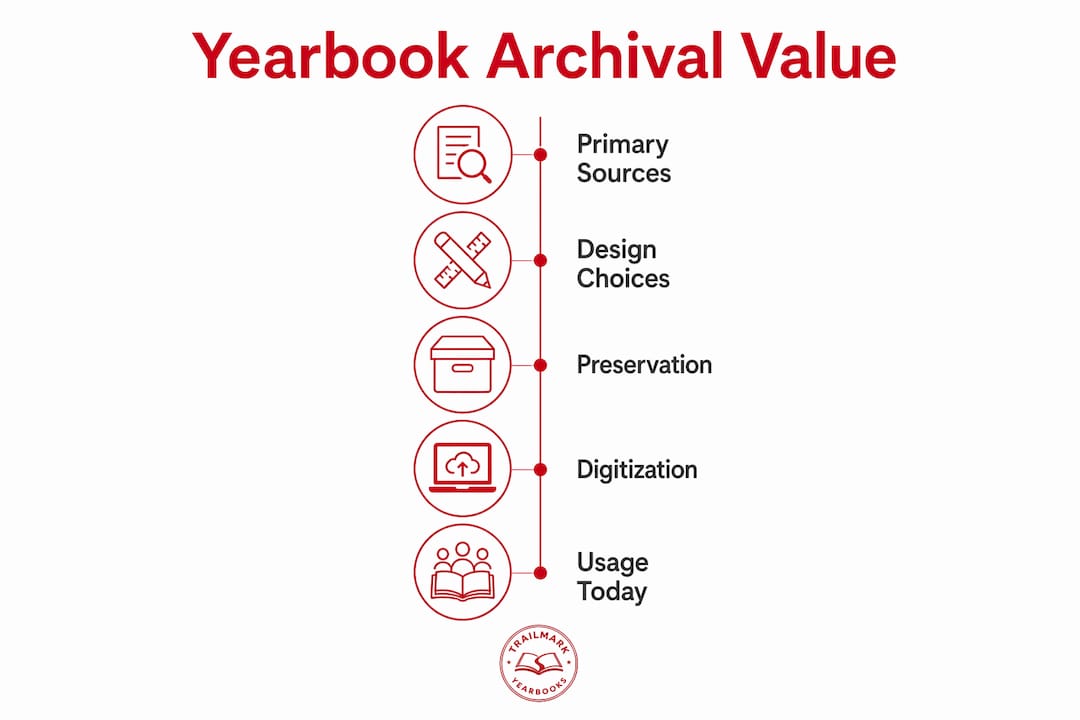
One important caveat historians raise: yearbooks are curated, not neutral. Choices about who gets photographed, which clubs receive full-page spreads, and which events get captions reveal institutional priorities and biases. Cultural critic Kate Eichhorn documents cases where minority student movements were omitted or controversial events were sanitized. That curation is itself historically meaningful — which is exactly why preservation plans should include contextual notes alongside the yearbook itself.
How are yearbooks actually used today?
The uses go well beyond nostalgia. Schools that understand the full range are better positioned to justify preservation budgets and design decisions.
- Academic research and local history: Historians use yearbooks to trace demographic shifts, fashion, and community values across decades.
- Genealogy: Families searching for relatives rely on yearbook photos and club rosters when other records are incomplete.
- Alumni engagement and fundraising: IUP archival staff confirm that yearbooks drive alumni engagement and can increase institutional support.
- Classroom primary-source work: Teachers use yearbooks to teach students how to read historical documents critically.
- Legal and reputation contexts: Digitized yearbooks are globally searchable and have appeared in litigation and background investigations.
A history teacher who assigns a 1965 yearbook alongside a civil rights timeline gives students something no textbook provides: the texture of ordinary school life during an extraordinary moment. That kind of primary-source teaching is increasingly common, and it depends on the yearbook being well-captioned and accessible.
Once a yearbook is digitized and indexed, it is permanently searchable — by employers, landlords, journalists, and anyone else with an internet connection.
Schools should treat that reality as a design and policy constraint, not an afterthought. Privacy planning belongs in the production workflow, not the post-publication panic.
What design choices increase a yearbook's archival value?
Good archival design is mostly discipline, not extra work. These are the decisions that determine whether a yearbook is useful in 50 years.
- Print the full school name, city, state, and academic year on the front cover, spine, and back cover.
- Caption every photo with full names (first and last), roles, and the event or date.
- Use consistent, machine-readable terminology for clubs and teams — avoid slang abbreviations that future readers won't recognize.
- Shoot and save images at the highest resolution your workflow supports; 300 DPI minimum for print.
- Record photo credits and, where relevant, the photographer's name.
- Keep a permission log for every student photo used.
What to avoid: Captions that say only "seniors celebrate" with no names. Slang-only club identifiers ("the Crew"). Omitting the year from interior pages. Saving only compressed JPEGs and discarding the originals.
What to prefer: Explicit, full-name captions. Standardized file naming from day one. Alt-text descriptions embedded in digital files. A record of which students declined to be photographed and why.

Pro Tip: Embed IPTC metadata fields (caption, creator, date, school name) directly in your master image files at the point of capture. Most professional cameras and editing tools support this — and it survives file transfers in ways a spreadsheet does not.
For senior portraits, working with a photographer who delivers high-resolution files with embedded metadata saves significant cleanup time later.
How should schools preserve and digitize yearbooks?
Physical preservation comes first. Store paper yearbooks in a cool, dry environment — ideally 60–70°F with 30–50% relative humidity — in acid-free sleeves with spines supported upright or flat. Never stack heavy volumes on top of fragile ones.
For digitization, follow this workflow:
- Assess condition. Note torn pages, fragile spines, and faded ink before touching anything.
- Prepare the volume. Gently clean covers; never force a tight binding open flat.
- Scan non-destructively. Use a V-shaped cradle or overhead scanner that protects fragile bindings — never a flatbed that requires pressing the spine.
- Create master files. TIFF format, 400 DPI minimum for archival masters.
- Generate derivatives. Compressed JPEGs or PDFs for web access; searchable PDF with OCR for text discovery.
- Capture metadata. School name, year, edition, page numbers, photographer credits, and caption text.
- Store and back up. Three copies: local server, off-site backup, and cloud storage.
| Format | Use | Minimum DPI |
|---|---|---|
| TIFF | Archival master | 400 |
| JPEG | Web delivery | — |
| Searchable PDF | Public access / OCR | 300 |
Host digitized yearbooks through your school library's repository, a local public library system, or a vetted archive platform. The goal is discoverability with access controls — not just storage.
What do digitization projects typically cost and how long do they take?
Timelines and costs vary significantly by collection size and condition, but these ranges give a realistic planning baseline.
| Phase | Small (1–several books) | Medium (several to many books) | Large (many books) |
|---|---|---|---|
| Assessment | 1–2 days | 3–5 days | 1–2 weeks |
| Scanning | 1–2 weeks | 3–6 weeks | 2–4 months |
| Metadata / OCR | 1 week | 2–4 weeks | 1–3 months |
| QA and delivery | 2–3 days | 1–2 weeks | 2–4 weeks |
Per-page scanning costs from professional vendors typically run $0.10–$0.50 per page for standard work, rising with color complexity, required metadata, or poor physical condition. Per-book estimates for a standard 200-page yearbook often fall in the $30–$80 range, not including hosting.
Pro Tip: Get written quotes that specify exactly what file formats you receive, who retains rights, and what the long-term hosting arrangement looks like. Budget for ongoing migration and backups — a one-time scan that sits on an obsolete format in five years is not preservation.
What should you ask vendors and where should you host digitized yearbooks?
Before signing with any digitization or hosting vendor, get clear answers to these questions:
- Do you use non-destructive scanning equipment (cradle or overhead scanner)?
- What file formats will you deliver, and do we receive the master TIFF files?
- Does your process include OCR and descriptive metadata capture?
- Who owns the digitized files and the metadata after delivery?
- What are your data security and student privacy controls?
- How do you handle takedown requests from individuals who appear in the yearbook?
- Can you provide sample deliverables and references from comparable school projects?
For hosting, the three main options each have trade-offs. A local institutional repository (school or public library server) gives you full control but requires IT resources and a migration plan. A community archive or state library system offers broader discoverability and shared infrastructure. Vendor-hosted public archives maximize access but may limit your control over privacy settings and takedown processes.
Copyright in a school yearbook is typically held by the school or district as the commissioning institution, though individual student contributions may carry their own rights. Any hosting agreement should explicitly address student data privacy, access tiers, and the school's right to remove content on request.
Pre-publication checklist for archival quality and privacy
Run through this before sending any yearbook to print or posting it digitally.
- Confirm full school name, city, state, and academic year appear on cover, spine, and at least one interior page.
- Verify every photo caption includes full first and last names.
- Check that club and team names match the school's official terminology.
- Confirm photo release and consent forms are collected and filed for every student pictured.
- Save uncompressed master image files in a named, dated folder separate from production files.
- Embed IPTC/EXIF metadata in master files (school name, year, photographer, caption).
- Document any students who opted out of photography and confirm they are not included.
- Set a written retention policy: how long masters are kept and who is responsible.
- Identify your hosting platform and confirm access controls before publishing digitally.
- Establish a documented process for privacy or takedown requests — name a contact, set a response timeline.
- Back up masters to at least two separate locations before the print file is submitted.
- Review yearbook policy best practices for your district's specific compliance requirements.
Key Takeaways
A school yearbook's historical archive value is determined by the metadata, design discipline, and preservation planning built into it from day one — not added later.
| Point | Details |
|---|---|
| Yearbooks are primary sources | They document student life and community culture in ways administrative records cannot replicate. |
| Metadata is the foundation | Full names in captions, embedded IPTC fields, and consistent file naming determine future discoverability. |
| Digitization requires a workflow | Non-destructive scanning, TIFF masters, OCR, and three-location backup are the minimum standard. |
| Privacy must be planned, not patched | Consent forms, access controls, and a takedown process belong in production, not post-publication. |
| Community engagement multiplies value | Alumni involvement in identifying photos and adding context makes archives richer and more accurate. |
A note on stewardship from Trailmarkyearbooks
The schools that get the most from their yearbook archives are the ones that treat each edition as a document, not just a keepsake. That starts with production choices — and it is exactly where Trailmarkyearbooks can help.
With free design assistance, flexible tools including Canva, InDesign, and an online creator, and transparent all-inclusive pricing with no hidden fees, Trailmarkyearbooks makes it straightforward to build archival quality into your yearbook from the first layout decision. Fast 2–3 week turnaround means you are not racing a deadline at the expense of caption accuracy or file quality.
One practical addition worth including in your yearbook project plan: a simple archival clause specifying that master files are retained for a minimum of ten years, stored in at least two locations, and that the school retains full rights to all digital deliverables. It takes one sentence to write and saves significant headaches later.
Request a sample from Trailmarkyearbooks to evaluate production quality before you commit — and ask specifically about file formats and master file delivery when you do.
Useful sources and further reading
- High School Yearbooks: Using and Preserving The Record — Peer-reviewed history journal article; the foundational scholarly case for yearbooks as primary sources.
- When Yearbooks Became History (IUP) — IUP archival staff on alumni demand and institutional value.
- Libraries Preserving Past with Digital High School Yearbooks (Annie Peterson, A.L.A.) — American Library Association perspective on community heritage.
- School Yearbook (Kate Eichhorn, University of Chicago Press) — Critical analysis of yearbooks' ambivalent history, including omission and reputation uses.
- Yearbook Privacy and Digital Access (Illinois State University) — Practical analysis of privacy risks from digitized, searchable yearbook archives.
- The Benefits of Digitizing Yearbooks (Advantage Archives) — Vendor guidance on non-destructive scanning, file formats, and hosting.
- Why Do Schools Have Yearbooks? (Best History Class) — Practical classroom guide covering physical preservation basics and primary-source use.
- Yearbook Student Data Privacy Guide (Trailmarkyearbooks) — Adviser-focused privacy and consent guidance for school yearbook programs.
- Yearbook Program Compliance Requirements (Trailmarkyearbooks) — Compliance checklist and recordkeeping guidance for school programs.
The part most schools skip
Schools spend months on cover design and zero minutes on file retention policy. That imbalance is where archival value quietly disappears.
The scholarship is clear: yearbooks are among the most-requested items in local archives, and the ones that get used are the ones with names in the captions and masters that survived a server migration. The ones that get ignored are the ones where "seniors celebrate" is the only caption on a two-page spread, or where the original files were saved as compressed JPEGs on a USB drive that nobody can find.
What I find underappreciated is the legal dimension. Most advisers think about privacy in terms of embarrassing photos. The more pressing issue is that a digitized, OCR-indexed yearbook is a permanent, globally searchable document. A student's name attached to a club, a quote, or even a candid photo can surface in a background check decades later. That is not a reason to avoid digitization — it is a reason to build consent documentation and a takedown process into your workflow before you publish anything online.
The other thing worth saying plainly: yearbook curation is not neutral. Who gets a full-page senior portrait and who gets a thumbnail in the back of the activities section is a historical record of institutional priorities. Future researchers will read that. Documenting your editorial process — even briefly, in a note filed with the master files — gives those researchers context they cannot get anywhere else.
Good stewardship is not complicated. It is mostly discipline applied early, before the files get compressed and the captions get shortened because the deadline is tomorrow.