

A digital yearbook is an interactive, shareable version of a school yearbook that lives online instead of only on paper, and for most schools the smartest starting point is a cloud-native format with embedded video and built-in privacy controls, not a plain PDF. TrailMark Yearbooks and other production teams see the same pattern every fall: schools that pick a format before staffing the workflow finish weeks late.
- Choose your format and privacy plan first. Decide between a flipbook-style layout or a cloud-native interactive page before assigning any tasks.
- Delegate photo and content collection immediately. Hand this to student editors with a submission form so proofing doesn't stall in March.
Key Takeaways
A successful digital yearbook depends on picking a cloud-native or flipbook format early, locking privacy settings before collecting student content, and building proofing time into the school calendar.
| Point | Details |
|---|---|
| Pick format first | Choose between cloud-native interactive, flipbook converter, or PDF before assigning tasks. |
| Set privacy early | Configure password protection and access controls before students start submitting content. |
| Budget real proofing time | Plan two proofing cycles of about a week each, not one rushed pass. |
| Save an archival master | Keep a print-ready PDF separate from the interactive version for reprints. |
| Consider full-service support | Trailmarkyearbooks offers a 2 to 3 week turnaround with free design assistance and flexible tools like Canva and InDesign. |
Table of Contents
- What Are the Main Digital Yearbook Formats?
- What Features Should You Check Before Choosing a Tool?
- How Do You Actually Build and Publish One?
- What Do Digital Yearbooks Typically Cost?
- DIY Editor, Flipbook Converter, or Full-Service: Which Fits Your School?
- How Does Trailmarkyearbooks Support Advisers and Schools?
- Ready to Talk Production? Here's Where to Start
- Sources
What Are the Main Digital Yearbook Formats?
Four formats cover almost every school's needs. A static PDF is just your print file shared as a download. It's cheap and universal, but flat, with zero interactivity. A flipbook or page-turn converter takes that same PDF and adds page-flip animation, often with embedded video or background music, but these tools mainly reproduce your printed layout rather than building something new. A cloud-native, mobile-first platform is built for interactivity from the start: searchable captions, embedded media, and analytics on who's actually viewing pages. Full app or packaged formats exist too, but they demand more IT overhead than most K-12 programs want to take on.
- PDF: cheapest, works everywhere, no interactivity.
- Flipbook converter: nice page-turn feel, moderate cost, limited beyond that.
- Cloud-native: highest interactivity, best for video and mobile viewing, usually a hosting fee.
- Hybrid print+digital bundle: combines a printed keepsake with an online companion.
Pro Tip: Don't assume a flip converter gives you real interactivity just because pages animate. Genuine engagement requires a deliberate second pass to import media, tag captions, and set access permissions after your layout is locked.
What Features Should You Check Before Choosing a Tool?
Run any platform or workflow through this checklist before your school commits budget or staff time to it.
- Multimedia embedding. Can you drop in video clips and audio, not just static images?
- Linkable, searchable captions. Flipbook players increasingly support AI-generated alt text alongside standard captions.
- Responsive, mobile viewing. Most parents and students will open the yearbook on a phone, not a desktop.
- Accessibility support. Screen-reader compatibility and alt text matter for compliance, not just convenience.
- Print-ready export. You still want a PDF master file you can send to a printer or archive.
- Password protection and download permissions. Control who can view, share, or save pages.
- Analytics and sharing controls. Know whether pages are being viewed and by whom.
Privacy deserves its own line item, not an afterthought. School data agreements spell out who can view or edit school-managed digital resources, and that framework matters more once yearbook content includes student names, photos, and personal milestones. Trailmarkyearbooks's own guide to student data privacy walks advisers through setting access levels before publishing, which is the step most schools skip until a parent asks who can see the link.
How Do You Actually Build and Publish One?
The workflow breaks into six stages, and skipping the order usually costs you a proofing cycle later.
- Plan the structure. Set page count, sections, and a rough content calendar tied to your school year.
- Collect content. Use a submission form with required metadata (student name, event, photo credit) so you're not chasing down missing captions in April.
- Design and lay out. Work in whatever tool fits your staff's skill level, whether that's Canva, Adobe InDesign, or an online creator built for yearbooks.
- Review and proof. Run at least two proofing passes, one for content accuracy and one for design consistency.
- Publish. Push to your chosen format, whether that's an embedded page on the school site or a hosted flipbook link.
- Archive. Save a print-ready master file separately from the interactive version so you always have a reprint-safe copy.
Roles matter as much as steps. Advisers own the timeline and approvals. Student editors handle photo collection and captions. A teacher or IT staffer manages access controls and hosting. Parents, when involved, usually just submit baby photos or senior tributes through the same form everyone else uses.
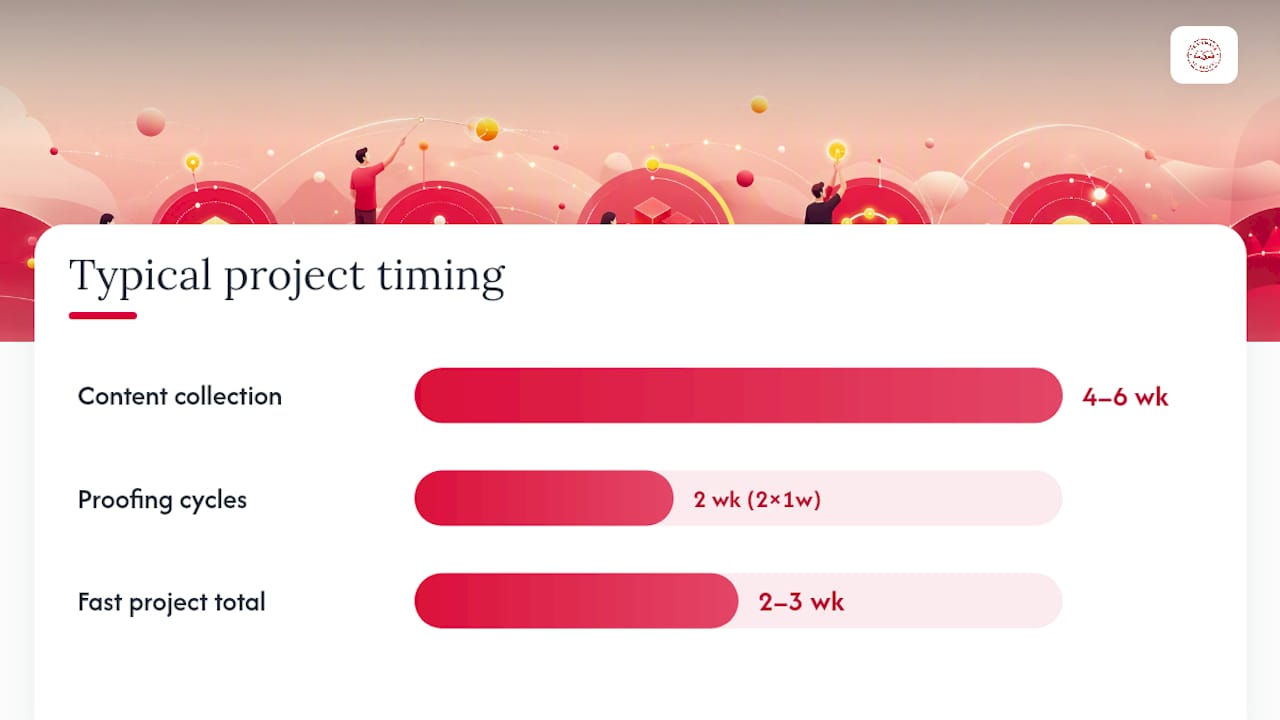
For timing, a typical school gives content collection four to six weeks, then runs two proofing cycles of about a week each before publishing. A fast project (think a spring supplement or a club-specific mini-yearbook) can compress that into two to three weeks total if the design template is already built. Trailmarkyearbooks's breakdown of online creator tools walks through which parts of that workflow different tool types handle well.
What Do Digital Yearbooks Typically Cost?
Pricing follows a few common patterns. Free-tier editors exist for basic layout work but usually cap page counts or watermark exports. Per-yearbook hosting fees apply once you go cloud-native, since someone has to serve that video content. Print-plus-digital bundles charge per copy but often roll the digital companion in at low or no extra cost. Full-service packages charge a flat rate that covers design, production, and hosting together.
- Budget more time (and often more cost) as multimedia embedding and page count grow.
- Proofing cycles stretch timelines more than any single design decision.
- Bundling digital hosting with a print order is usually more cost-efficient than buying them separately.
- Ask about free design assistance before paying for extra design hours you might not need.
DIY Editor, Flipbook Converter, or Full-Service: Which Fits Your School?
Each approach trades staffing time for control, and the right choice depends on what your team actually has bandwidth for this year.
- DIY editor (Canva, an online creator): lowest cost, highest staff time demand, works well if you have a design-savvy adviser or student team.
- Flipbook converter: fast to set up from an existing PDF, moderate interactivity, but the page-turn effect is often the main selling point rather than deep functionality.
- Cloud-native platform: strongest interactivity and mobile support, but usually means learning a new tool and paying an ongoing hosting fee.
- Full-service production: highest cost per hour saved, but the most predictable timeline and the least risk to your archival copy.
For long-term archiving and reprints, full-service and cloud-native approaches tend to hold up best because they're built around keeping a print-ready master file alongside the interactive version. DIY and converter workflows can work just as well, but only if someone on staff remembers to save that archival PDF separately, which is exactly the step that gets forgotten when everyone's racing a deadline.
How Does Trailmarkyearbooks Support Advisers and Schools?
Trailmarkyearbooks builds its production process around the parts of this workflow that eat up adviser time. That means a fast 2 to 3 week turnaround once files are finalized, free design assistance for schools that don't have a dedicated designer, and flexible design options so your team can work in Canva, Adobe InDesign, or an online creator, whichever fits your staff's existing skills.
- Fast 2 to 3 week production turnaround after final files are submitted.
- Free design assistance included, not sold as an upsell.
- Flexible design tools: Canva, InDesign, or an online creator.
- A dedicated adviser and password-protected resource hub for ongoing support.
That turnaround window covers standard production once your layout is locked. Schools that add heavy custom multimedia work or multiple late proofing rounds should expect extra time on either end.
Pro Tip: Request a sample early in your planning cycle, even before you've finalized your design. Seeing an actual production sample tells you more about print quality and page layout than any product page can.
An adviser's take on what actually works
Every yearbook I've watched succeed had one thing in common: the adviser set up submission forms with required fields before asking a single student for a photo. That single step, done early, saves an entire proofing cycle later. Privacy settings and accessibility choices belong at the start too, not the end.

Ready to Talk Production? Here's Where to Start
If you've read this far, you already know the tradeoffs between a DIY editor, a flipbook converter, and a cloud platform. Trailmarkyearbooks takes a different route: instead of asking your staff to learn new software, it pairs a dedicated adviser with free design assistance and lets you work in Canva, InDesign, or its own online creator, whichever your team already knows.
That flexibility matters most for schools with tight staffing, since you're not retraining anyone to hit a deadline. Turnaround runs 2 to 3 weeks once files are final, and print and digital can be bundled so you're not managing two separate vendors or two separate budgets. If you want to see the quality before committing, request a sample or browse the full production packages to compare options against your school's timeline.