

Most schools land within a range spanning from a few dozen pages to approximately a hundred, and the final number depends on how much coverage you want and what your printer's signature rules allow. Elementary books often fall toward the lower end of that range, middle schools in the middle, and high schools toward the higher end. Nail down your coverage goals first, then check the math against printer constraints before you touch layout.
TL;DR:
- Most schools need between 32 and 100 pages, with elementary books on the lower end and high-school yearbooks on the higher end depending on coverage.
- Yearbooks must have page counts in multiples of four, preferably eight or sixteen, to match printer signatures and avoid extra costs.
- Building a detailed yearbook ladder ensures balanced coverage and helps allocate pages by section, preventing last-minute cramming.
- Drop content strategically by photos or captions rather than expanding pages unnecessarily, choosing layouts that maximize space without sacrificing quality.
- Lock your final page count early, confirm minimum page multiples with your printer, and use sample books to evaluate paper weight and binding options.
Table of Contents
- How Many Pages Does a Yearbook Need Based on Enrollment?
- Why Yearbook Printers Require Pages in Multiples of 4 or 8
- How Do You Build a Yearbook Ladder?
- Which Trim Size and Binding Fit Your Page Count?
- What Does Adding Yearbook Pages Cost?
- Production Checklist: Deadlines, File Specs, and Proofs
- Quick Page Ideas to Fill Odd Page Counts
- Balancing Content Quantity With Design Aesthetics
- Common Yearbook Page Layouts and Their Effect on Page Count
- How to Trim Content to Fit Your Page Limit
- Balancing coverage with a readable book
- Let TrailMark Help You Lock In Your Page Count
- Sources
- FAQ
How Many Pages Does a Yearbook Need Based on Enrollment?
Enrollment drives your starting estimate, but coverage density decides where you land inside the range. A widely used adviser shortcut maps roughly one spread for every 16 to 24 students, depending on how many photos you want per student and how many events you're covering.
Here's the quick math: take your enrollment, divide by your target students-per-spread, and that gives you spread count. Multiply spreads by two for pages, then round up to your printer's required multiple.
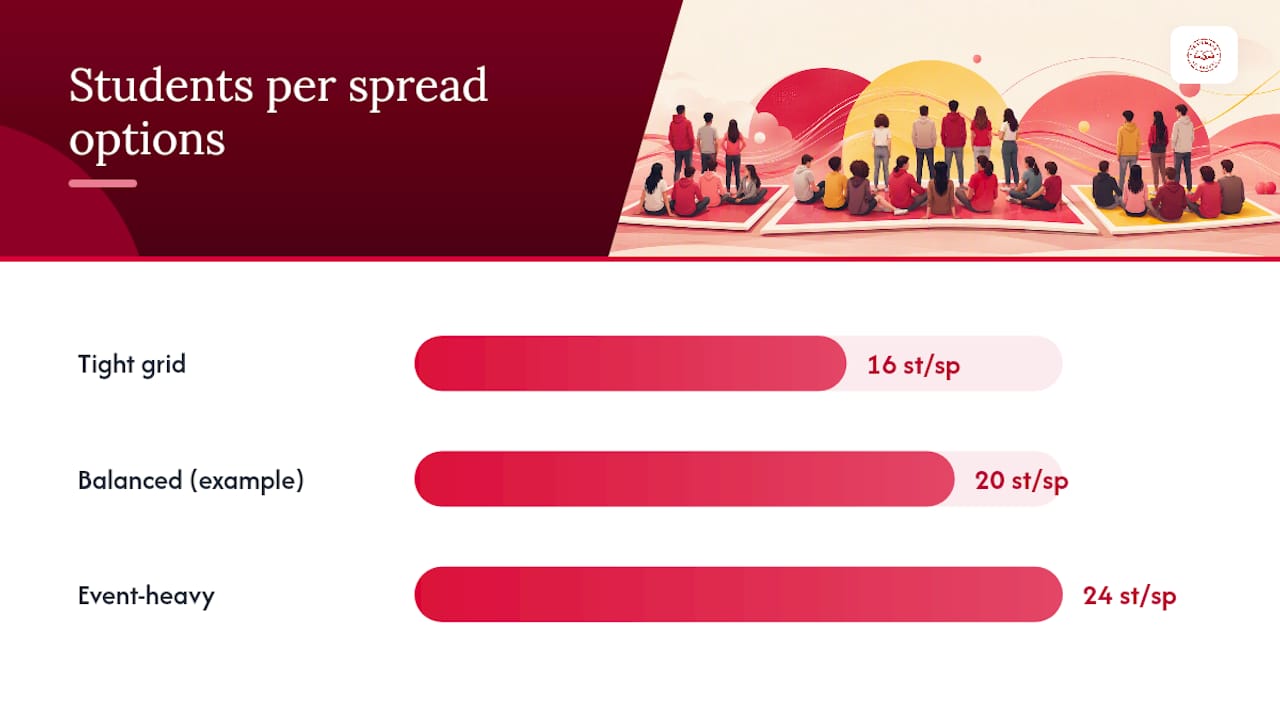
Example: A 400-student middle school aiming for one spread per 20 students needs 20 spreads, or 40 pages, before adding clubs, sports, and front matter. Add another 20 to 30 pages for those sections and you're near 64 pages.
Published guides show these common ranges by enrollment:
- Under 50 students: a smaller number of pages
- 50 to 300 students: a moderately sized page count
- 300 to 500 students: a larger page count
- 500+: a higher page count, depending on how portrait-heavy or event-heavy the book is
A portrait-focused book with tight grids needs far fewer pages than an event-heavy book chasing every game, club meeting, and assembly. Decide which philosophy fits your staff before locking a number.
Why Yearbook Printers Require Pages in Multiples of 4 or 8
Printers bind books in folded signatures, not loose sheets, so your final page count has to land on a multiple of 4 at minimum. Many printers actually prefer multiples of 8 or 16, since that's how signatures fold and trim cleanly.
This matters more than it sounds. Land three pages over a signature boundary and you often pay for the entire next signature anyway, whether you use those extra pages or not.
- Confirm your printer's minimum page count and required multiple before designing a single spread
- Build in a buffer of 4 to 8 pages so late additions don't force a signature jump
- Remember that spine thickness depends on both page count and paper caliper, so a heavier stock changes your spine width even at the same page count
Pro Tip: Lock your page count before you finalize cover artwork. Case-bound covers need exact spine measurements, and those depend on final page total and paper weight, not a placeholder guess.
Pick your page count early, before design work starts, so you're not rebuilding spreads later to hit a signature.
How Do You Build a Yearbook Ladder?
A yearbook ladder is a section-by-section map of every page in the book, and it's how you turn a raw page count into a real plan. Instead of guessing how many pages sports gets versus clubs, the ladder assigns pages by section up front so coverage stays fair and nothing gets crammed in at the last minute.
A typical ladder for a 64-page middle school book might look like this:
- Cover, title, and dedication: 4 pages
- Portraits by grade: 16 to 20 pages
- Sports spreads: 10 to 14 pages
- Clubs and activities: 8 to 10 pages
- Features and candid highlights: 8 to 10 pages
- Ads, recognition pages, and index: 6 to 8 pages
Reserve a handful of flexible pages, commonly 10 to 15 percent of the total, for late-breaking coverage or to absorb an odd page or two without breaking your signature count. Low-content filler pages, like a sidebar list or a simple grid, are useful tools for hitting an even number without another photo shoot.
Which Trim Size and Binding Fit Your Page Count?
Trim size and binding type both cap how many pages actually make sense for your book. Standard portrait 8.5 by 11 inches works for most elementary and middle school books, while photo-dense high school yearbooks often move to a larger 9 by 12 trim to give team and club photos more room.
Binding matters just as much:
- Saddle-stitched books work well under roughly 48 pages, since stapling through the spine gets bulky past that
- Perfect-bound softcovers handle a wider range and suit most 40 to 100 page books
- Case-bound hardcovers handle the largest counts and hold up better for books that run past 100 pages
Paper caliper changes your spine thickness at any given page count, so a heavier stock on a 96-page book can produce a noticeably thicker spine than lighter stock at the same count. If your page count keeps climbing year over year, plan the binding switch before you're forced into it by a printer's page cap.
What Does Adding Yearbook Pages Cost?
Cost scales with three things: paper weight, binding type, and print run size, not page count alone. A jump from 64 to 72 pages costs less per copy than switching from perfect binding to case-bound, so know which lever you're pulling before you request quotes.
A few practical ways to keep spending in check:
- Sell recognition ads to offset the cost of extra pages instead of cutting coverage
- Use lighter paper stock in text-heavy filler sections and save the premium stock for photo spreads
- Get firm pricing on proofs and reprints early. Rush fees and last-minute reprints are common hidden costs that blow past budget in a bar the page count itself never touched
Ask your printer for per-page cost sensitivity at your specific run size before finalizing your ladder. Pricing per copy shifts more with total print run than most advisers expect.
Production Checklist: Deadlines, File Specs, and Proofs
Lock your final page count before anything else moves forward. Everything downstream, trim, bleeds, cover wrap, spine width, depends on that number being fixed.
- Confirm trim size, bleed area, and image resolution (usually 300 DPI minimum) with your printer
- Set exact live-area and bleed dimensions for recognition ads before families submit artwork, since generic sizing invites rebuild work at proof stage
- Establish a folder and file-naming structure before pages start coming in from multiple staffers
- Set proof approval deadlines with a real calendar date, not "sometime in the spring"
- Assign one primary contact and one on-site proof approver so decisions don't stall
Publisher checklists consistently flag deadline dates, file formats, and proof timelines as the items most often skipped until it's too late. TrailMark's proofing process runs on a 2 to 3 week turnaround with free design help available, which gives advisers room to catch errors without blowing a hard deadline.
Pro Tip: Build your proof review into your school calendar the same way you'd schedule a testing window. A proof that sits unread for a week is the single most common cause of missed print dates.
Quick Page Ideas to Fill Odd Page Counts
When you're two pages short of your next signature, you don't need a new photo shoot. A handful of low-effort formats can fill space fast:
- Pet spreads (student-submitted photos, minimal captions)
- Spirit quizzes or superlative polls
- Then-and-now comparison pages
- Top-ten lists (songs, memes, lunch trends)
- Student art showcase pages
- "Guess who" baby-photo grids
- Sidebar trivia or school-history facts
- Staff and teacher candid pages
Most of these require little new photography, just crowdsourced submissions and simple text layouts. A spirit quiz, for example, can turn a single Google Form's worth of responses into a full spread with graphics and pull quotes, no camera needed.
Balancing Content Quantity With Design Aesthetics
More pages don't automatically mean a better yearbook. A 100-page book stuffed with cramped grids and tiny photos reads worse than a tight 64-page book with breathing room and clean layouts.
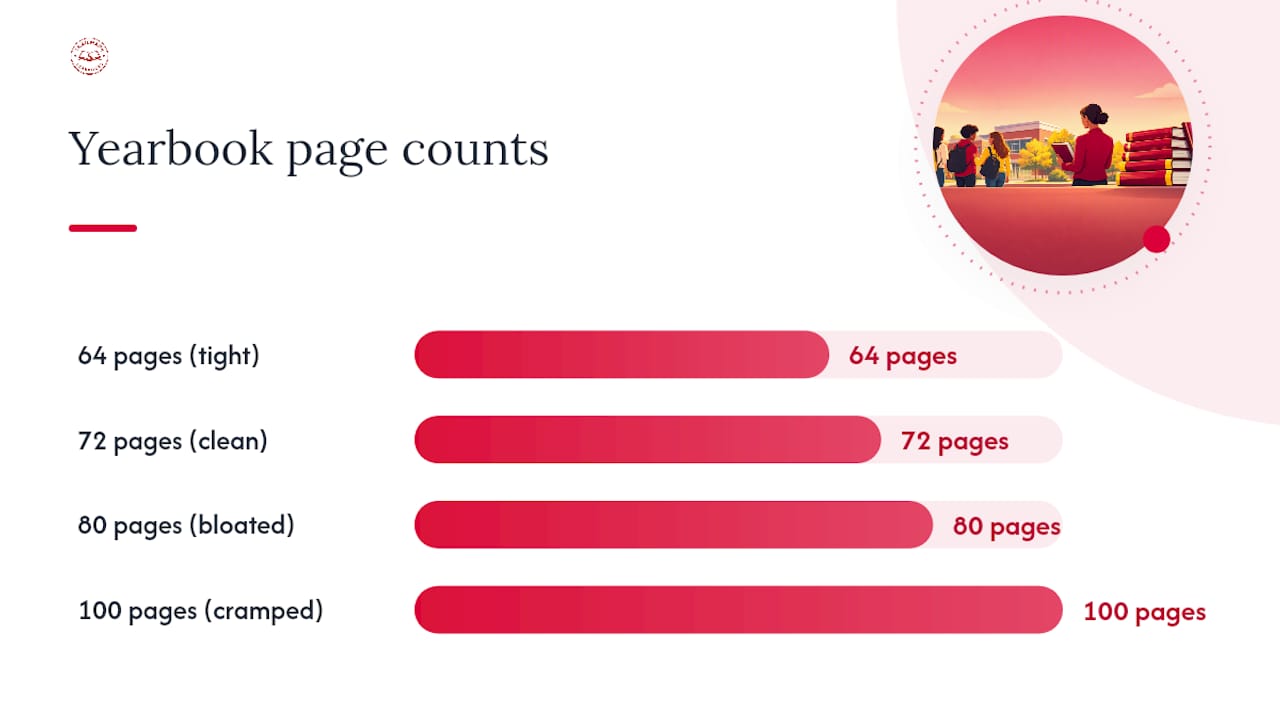
The trap most advisers fall into is trying to include everything rather than including everything well. Before adding pages, ask whether the content actually needs more room or whether it needs better cropping and stronger grid choices on the pages you already have.
A few working rules:
- Set a firm photo-per-spread cap, usually 15 to 25 depending on layout style, and resist the urge to squeeze in "just one more"
- Give feature spreads more white space than portrait pages; readers process it as higher quality even when it uses the same photo count
- Reserve your highest-impact photography for the front third of the book, since that's where readers spend the most time flipping
If you're debating between adding four pages or tightening existing layouts, tightening usually wins. A cleaner 72-page book beats a bloated 80-page one almost every time, and it costs less to print.
Common Yearbook Page Layouts and Their Effect on Page Count
Layout choice changes how much content fits per page, which changes your total count more than most advisers realize. A grid layout with 12 uniform portrait boxes fits far more students per page than a magazine-style layout with one large photo and generous captions.
Three layout patterns show up most often:
Grid layouts pack the most content per page and work best for portraits and club rosters. They're efficient but can look flat if overused across the whole book.
Modular layouts mix photo sizes on a page, one large image with two or three smaller ones, and suit sports and event coverage where you want a hero shot plus supporting action.
Magazine-style spreads use large photos, pull quotes, and heavy white space. They look polished but eat far more pages per unit of content than grid layouts do, so use them sparingly if your page budget is tight.
If your staff is small, modular portrait grids stretch further than custom feature spreads, since grids reuse the same template across dozens of students instead of designing each page from scratch.
How to Trim Content to Fit Your Page Limit
Cutting content is easier when you decide the cuts by category, not by scrambling page by page. Start with duplicate coverage: if three different sections cover the same pep rally, keep the strongest photos in one place and drop the rest.
A practical approach for advisers running short on pages:
- Cut caption length before cutting photos. Long captions eat layout space that photos use more effectively
- Combine small clubs into a shared spread instead of giving each one its own half page
- Move less time-sensitive content (like a "welcome back" spread) to filler status first, since it's the easiest to shrink without complaints
- Ask staff sponsors which club or team activities actually happened this year before assuming every group needs full coverage
When cuts still don't get you to a clean signature multiple, that's when a filler page from your idea bank earns its place, better to add a simple sidebar page than to force awkward trims across five other sections just to hit an even number.
Balancing coverage with a readable book
Portraits earn priority when staff is small; event coverage earns priority when a section defines your school's identity. Reserve 10 to 15 percent of pages for flexibility, start with class portraits, then fund the rest through ad sales. Small staffs do better with modular portrait grids than ambitious feature spreads spread thin.
— Jace
Let TrailMark Help You Lock In Your Page Count
You can find instant, all-inclusive pricing online with no sales call and no hidden fees, so you can test different page counts and binding options and see real cost differences before committing to anything. Once your ladder is built and your page count is locked, a 2 to 3 week turnaround and free design assistance, whether you work in Canva, Adobe InDesign, or the built-in online creator, help avoid scrambling near deadline.

If you're still deciding between binding types or want to feel the paper weight before finalizing your spine calculations, request a sample book and see the difference firsthand. For middle schools weighing full design support against a do-it-yourself approach, TrailMark's design and production options cover both paths without locking you into a contract. Head to TrailMark's pricing and printing specs to see exact binding and page costs for your enrollment size, and get a number you can actually plan around.
Sources
For deeper detail on trim sizes and spine mechanics, see Kapa99's guide to yearbook and photo book sizes. For enrollment-based page math, TreeRing's yearbook page count guide breaks down the ratio further. For production timelines, review Touch Archives' step-by-step design guide.
- Yearbook & Photo Book Sizes: Dimensions, Spine & Page Setup
- How to design a yearbook, step-by-step guide for students & advisors
- 14 stunning yearbook page ideas for every section
FAQ
Is a 1,000-Page Book Big?
Yes, extremely high page counts are enormous by yearbook standards. Most school yearbooks run from a few dozen pages up to approximately one hundred depending on enrollment and coverage density, so a very large page count would be extraordinarily unusual for this format.
Is 100 Pages a Small Book?
No, 100 pages sits at the upper end of typical yearbook size. Most high schools finish around 80 to 100 pages, so a 100-page book represents a fuller, more comprehensive coverage approach rather than a small one.
What Is the Typical Size of a Yearbook?
Trim size and page count are two separate measurements. Trim is commonly 8.5 by 11 inches, while total page count typically falls between 32 and 100 pages depending on school size and coverage goals.
What Size Is a Quarter-Page Yearbook Ad?
Quarter-page ad dimensions vary by printer, so get exact live-area and bleed measurements from your specific production partner before families submit artwork. Confirming these specs up front avoids rebuild work at proof stage, since generic sizing assumptions rarely match a printer's actual grid.
How Many Pages Does My School Actually Need?
Start with enrollment divided by your target students-per-spread, then round up to your printer's required page multiple, usually 4, 8, or 16. TrailMark's production and pricing tools let you test different page counts against real cost before you commit to a final number.