

Start by completing the onboarding form and collecting the required signatures. Once that's signed, you'll get portal credentials and can build your first ladder the same week. Completing the yearbook onboarding process gets you a working portal, a page count, assigned staff, and access to templates and training so production can actually begin.
- Submit the onboarding form and route it to your principal or approved signer.
- Watch for a credentials email, then log in and create your ladder.
- Set your page count and assign staff to sections right away.
- Reach out to your publisher rep or join an orientation webinar if you get stuck.
Key Takeaways
Completing the yearbook onboarding process quickly requires a signed form, fast credential delivery, an early ladder, and clear staff roles from day one.
| Point | Details |
|---|---|
| Submit the form fast | Route your onboarding form to your principal or signer within the first few days to avoid delays. |
| Build your ladder immediately | Create your ladder and assign spreads as soon as credentials arrive to prevent duplicated coverage. |
| Learn core portal tools first | Master the ladder, message center, and templates before exploring advanced design features. |
| Confirm your timeline early | Lock in proofing windows and your final file date during your first rep meeting. |
| Lean on TrailMark support | Trailmarkyearbooks offers free design assistance, sample requests, and fast turnaround to support new advisers. |
Where to Go Next
- Yearbook Production Calendar: Your Year-Round Guide
- Yearbook Deadline Management Checklist for Advisers
- Quality, Fast, and Affordable Yearbook Production Services
Table of Contents
- The Yearbook Onboarding Process: A Step-by-Step Checklist
- Which Tools and Training Should You Learn First?
- Who Handles What During Onboarding?
- How Long Does Onboarding Actually Take?
- Common Onboarding Mistakes and Quick Fixes
- Getting the Most Out of Your Publisher's Support
- Connecting Onboarding to Your School's Systems
- Adjusting Onboarding for Your School's Size and Structure
- Get Hands-On Support From Day One With TrailMark
The Yearbook Onboarding Process: A Step-by-Step Checklist
Most publishers, including TrailMark, follow a similar pattern: form, approval, credentials, then setup. Knowing that sequence ahead of time saves you from refreshing your inbox wondering why nothing has happened yet.
- Fill out the onboarding form. Expect fields for school name, enrollment count, book size preferences, billing contact, and your name as the primary adviser. Pull enrollment numbers from your registrar if you don't have them handy.
- Route it for signature. Most publishers require administrative sign-off, often through a DocuSign-style e-signature step, before anything moves forward. This typically means the form goes from you to your principal or another delegated approver, and publishers generally require this approval before issuing credentials.
- Wait for your credentials email. Once signatures clear, you and any co-advisers listed on the form should receive login details, usually within a few business days.
- Log in and complete initial portal tasks. Create your ladder (the visual map of every spread in the book), pick a template set, and set internal deadlines for staff.
- Assign staff to sections. Don't wait until week three to divide up spreads. Assign them the day you get access so editors know what they own.
Pro Tip: Request your sample before you finalize any design decisions. It's much easier to pick a cover style when you're holding one in your hands instead of guessing from a thumbnail image.
If a step stalls, don't sit on it. A form stuck in someone's inbox for two weeks is the single biggest reason advisers fall behind before production even starts.
Which Tools and Training Should You Learn First?
You don't need to master every portal feature in week one. Focus on four things: the ladder, the message center, your to-do list, and your template library. Everything else can wait.
- Learn the ladder tool first. It's the backbone of your entire book and controls who's responsible for what.
- Pick templates for early sections (cover, front matter, sports) and save InDesign for staff who already know it.
- Sign up for an orientation webinar or watch short how-to videos, since these resources are built specifically to walk new advisers through the platform.
- Build a one-page "where to go for help" sheet with a QR code linking to short tutorial videos.
Pro Tip: Post that QR help-sheet by your classroom computers. Advisers who set up a quick-answer resource like this see far fewer repeat questions from students who forgot how to crop a photo.
Who Handles What During Onboarding?
Confusion over roles is what turns onboarding into chaos. Assign these before your first staff meeting, not after.
- Adviser: owns approvals, the rep meeting, the overall timeline, and final sign-offs on every spread.
- Editors: build the ladder, assign spreads to staff, and run copy checks before pages move to proofing.
- Photographers and content gatherers: cover assigned events and follow a consistent file-naming system from day one.
- Student marketing or parent liaison: sets up the school store and manages parent communications about ordering.
Full role breakdowns, including what to expect from underclassmen versus veteran staff, are covered in Trailmarkyearbooks' guide to adviser responsibilities.
How Long Does Onboarding Actually Take?
Form to credentials to first ladder usually moves fast when signatures don't stall. Plan around these milestones:
- Week 1: Form submitted, signatures collected, credentials issued.
- Days 30-60: Team roles finalized, theme chosen, ladder built, initial coverage planned. This window is when most publisher back-to-school guidance tells advisers to lock in staffing and theme decisions.
- Rep meeting: Confirm proofing windows, your final file deadline, and printing turnaround. A good rep meeting always covers the production timeline in detail, since that's what your entire calendar hangs on.
- Administration check-in: Confirm your dates match the school calendar, especially around finals and sports seasons.
For a fuller month-by-month breakdown, the yearbook production calendar lays out milestones through the whole year.
Common Onboarding Mistakes and Quick Fixes
Delayed signatures are the number one stall. Follow up within 48 hours if a form hasn't moved. Beyond that, watch for:
- Staff accounts with the wrong permissions, which blocks editors from approving spreads.
- Inconsistent photo file names that make sorting a nightmare by November.
- Skipping templates, which slows every new staffer down and breaks visual consistency.
Pro Tip: Adopt a simple naming rule like "EventName_Date_PhotographerInitials" from day one. A small set of repeatable templates also prevents the mid-year burnout that hits staff who redesign every spread from scratch.
For deeper fixes on timeline slippage specifically, see this adviser's guide to common delays.
Getting the Most Out of Your Publisher's Support
You're not onboarding alone. TrailMark backs new advisers with free design assistance, flexible workflows across Canva, InDesign, or its online creator, and a 2 to 3 week turnaround once files are final.
- Schedule a rep meeting in week one to confirm your page count and timeline.
- Request a sample book before finalizing paper or cover choices.
- Enroll in an orientation webinar to see the portal walked through live.
- Bookmark the Trailmarkyearbooks blog for practical guides written for advisers at every experience level.
Reaching out early, rather than after something breaks, is what separates a smooth first month from a frustrating one.
Connecting Onboarding to Your School's Systems
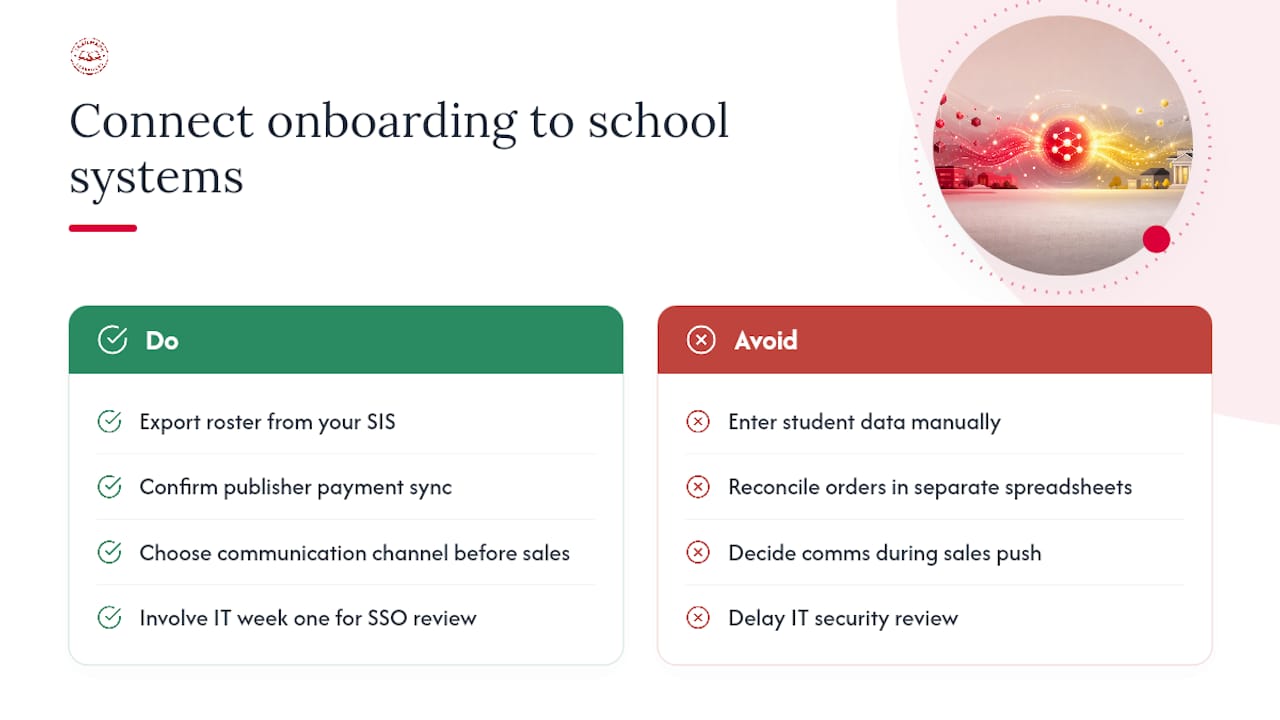
Your yearbook portal doesn't operate in a vacuum. It needs to line up with whatever your school already uses for enrollment, communication, and payments. Start by exporting your current student roster from your student information system, whether that's PowerSchool, Infinite Campus, or a similar platform, so names and grade levels flow accurately into name-tagging tools without manual entry errors.
Payment integration matters just as much. If your school store handles yearbook sales through a separate system, confirm early whether your publisher portal can sync order data or whether you'll be reconciling two spreadsheets by hand every week. Mismatched records here are a common source of headaches around delivery day.
Communication tools deserve the same attention. If your school runs on a parent communication platform, decide during onboarding how yearbook announcements, sale deadlines, and picture day reminders will get pushed out. Some schools loop this into existing newsletters; others set up a dedicated yearbook email list. Either works, but decide before your first sales push, not during it.
Finally, check single sign-on requirements. Some districts require any new software touching student data to clear an IT security review before staff accounts go live. If your school has that policy, loop in your IT department during week one of onboarding, not after your ladder is already built and staff are waiting on logins.
Adjusting Onboarding for Your School's Size and Structure
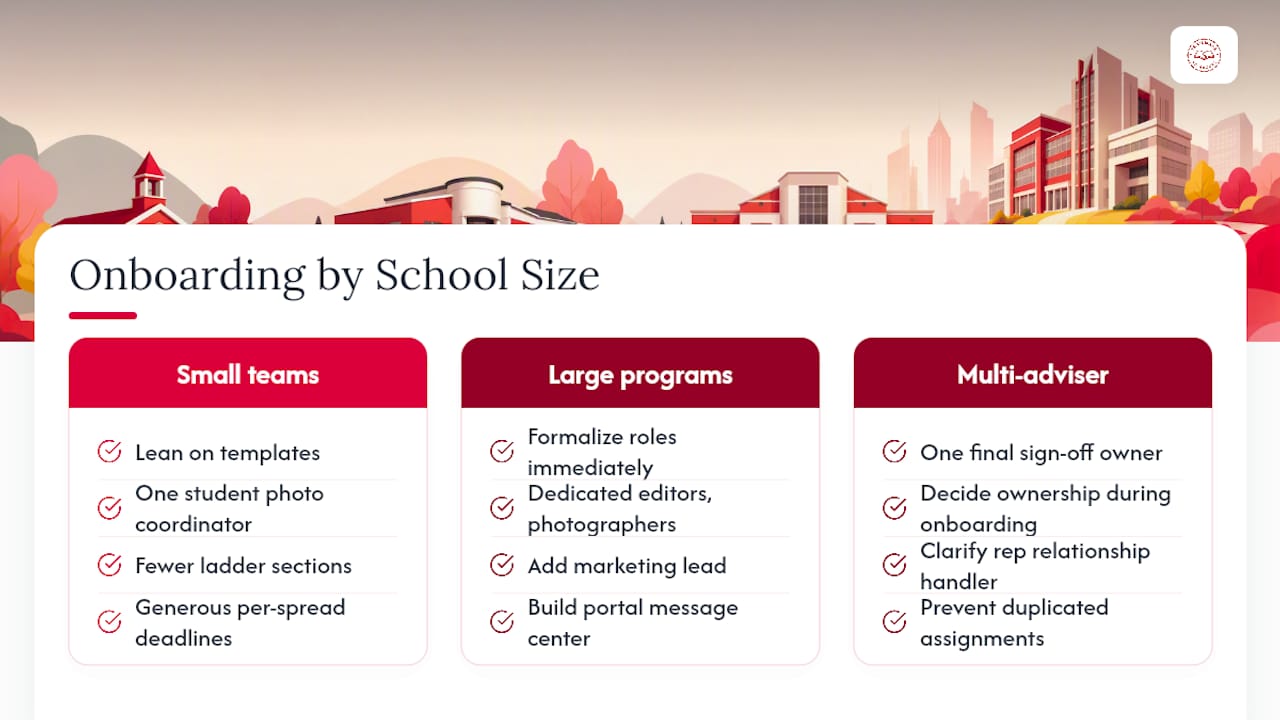
A one-adviser elementary program and a fifty-student high school staff need different onboarding paths, even though the underlying steps stay the same.
Small teams, often a single adviser with a handful of student helpers, should lean hard on templates and skip anything that adds administrative overhead. Assign one student as a de facto photo coordinator rather than splitting that role three ways. Keep the ladder simple: fewer sections, generous per-spread deadlines, and a shorter proofing cycle since fewer eyes need to review each page.
Larger programs with dedicated editors, photographers, and a marketing lead benefit from formalizing roles immediately. Build out your message center in the portal so editors can flag issues without pulling you into every conversation. Stagger spread deadlines by section instead of setting one blanket date, since sports coverage often finishes later than academics or clubs.
Multi-adviser situations, common in larger middle and high schools, need one clear owner for final sign-offs even when responsibilities are shared. Decide during onboarding, not mid-year, who has final say on the ladder and who handles the rep relationship. Ambiguity here is what causes duplicated spread assignments and missed deadlines later.
Whatever your team size, the core sequence, form, approval, credentials, ladder, holds. What changes is how much structure you build around it.
A Quick Word From the Author
Onboarding rewards momentum over perfection. In week one, prioritize your ladder, your staff assignments, and your rep meeting. Everything else can wait, and other advisers are happy to help if you ask.
Get Hands-On Support From Day One With TrailMark
Compared to publishers that bury advisers in sales calls or hidden fees, Trailmarkyearbooks gets you a working price and a real production plan without the runaround. You get instant, all-inclusive pricing online, free design assistance whether you work in Canva, InDesign, or the online creator, and a 2 to 3 week turnaround once your files are final, with no order deadlines forcing your hand.

If you're still deciding on paper stock or cover finish, request a sample before locking anything in. Ready to see full production options and pricing? Check out Trailmarkyearbooks' production services or reach out to a rep directly to talk through your school's timeline.