

A yearbook index is an alphabetical listing of every student name and key subject with corresponding page references, making the yearbook navigable and every student visible. Without a well-built index, readers flip through hundreds of pages hunting for a single face. This yearbook index creation guide walks you through the tools, step-by-step process, design choices, and inclusivity practices that separate a frustrating index from one that actually works. Tools like Adobe InDesign, Lifetouch Yearbooks, and BalfourTools each play a role in getting this right, and knowing which to use before you start saves hours of rework.
What are the essential tools and prerequisites for creating a yearbook index?
Before a single name gets typed, you need the right infrastructure. Three categories of assets matter: software, source data, and a tracking system. Skip any one of them and you will spend the final week before your deadline fixing preventable errors.

On the software side, Lifetouch Yearbooks offers a web-based index-building workflow built directly into its production platform, which means name data and page layouts live in the same environment. Adobe InDesign remains the standard for layout control, and InDesign templates from sources like Envato Tuts+ give you pre-built multi-column paragraph styles that handle alphabetical sorting visually. BalfourTools integrates name collection with page proofing, reducing the manual handoff between photography and layout teams.
Your source data requirements are equally specific:
- A complete, verified roster from your school's registrar, not last year's list
- Final page layouts with locked page numbers before index work begins
- A master spreadsheet or database where every name appearance gets logged with its page number
- Photo metadata files if your photography workflow supports tagging names to images
The tracking system is where most advisers cut corners. A shared Google Sheet or Airtable base with columns for last name, first name, page number, and verification status turns name collection into a repeatable process rather than a memory exercise. Assign one staff member per section of the book to own their entries. This division of labor catches gaps early and keeps the data clean enough to sort without manual cleanup later.
Pro Tip: Lock your page layouts before starting the index. Any page number shift after index work begins means re-verifying every entry in the affected section.
How do you build the yearbook index step by step?
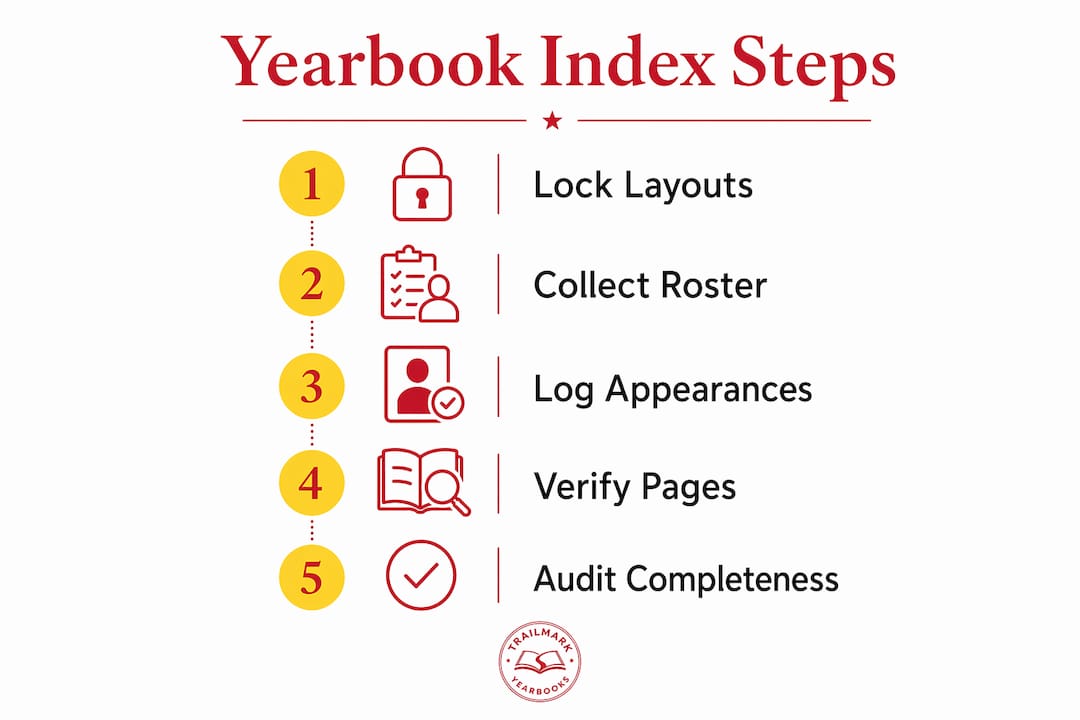
The 6-step indexing process from Touch Archive's 2026 guide is the clearest framework available for advisers who want accuracy and completeness. Each step builds on the last, and skipping ahead creates compounding errors.
-
Collect every name appearance systematically. Go page by page through the final layout. Every caption, headline, and body copy mention counts, not just portrait photos. A student named in the drama club caption on page 47 deserves that page reference just as much as their class photo.
-
Record page numbers for each appearance accurately. Log every instance in your master spreadsheet as you go. Do not rely on memory or batch-enter at the end of a section. Real-time entry is the single biggest time-saver in the entire process.
-
Alphabetize entries by last name, then first name. Sort your spreadsheet by last name column first, then apply a secondary sort on first name. This handles the Smiths and Johnsons without manual reordering. Export the sorted list directly into your InDesign index frame.
-
Cross-reference to verify page number accuracy. Pull ten random entries and physically confirm the page number in the layout file. If three of those ten are wrong, re-verify the entire section. Spot-checking is not optional; it is the quality gate.
-
Verify consistent name spelling throughout the book. Treating name variants as data quality issues requiring systematic correction is the professional standard. "Mia" in the portrait section and "Mya" in the club caption are not two students. They are one data error that will frustrate a family for decades.
-
Conduct a completeness audit. Compare your index entry count against your total enrolled student roster. If your school has 412 students and your index has 389 unique names, you have 23 students to find. Automation aids the process but cannot replace this final audit. Software does not know that a student transferred in after picture day.
Pro Tip: Run a VLOOKUP or COUNTIF in your spreadsheet to flag any roster name that appears zero times in your index log. This turns a manual search into a 30-second formula.
The most common pitfall at this stage is treating the index as the last task rather than a parallel workflow. Start logging names the moment page proofs are approved, not after the entire book is laid out.
What are the best design tips for a yearbook index?
Index design is a readability problem, not a decoration problem. The goal is to let a reader find a name in under ten seconds. Every design choice should serve that goal directly.
Basic vs. enhanced index formats
The two most common formats serve different schools and budgets:
| Format | Structure | Best for |
|---|---|---|
| Basic | Last name, First name: page numbers | Smaller schools, tight page budgets |
| Enhanced | Last name, First name (role/identifier): page count + pages | Larger schools, activity-heavy books |
The enhanced format adds identifiers like "Varsity Soccer, Student Council" next to a name, which helps readers distinguish between two students with the same name and adds context for families. The page count column, showing how many times a student appears, has become a subtle inclusivity signal. A student who appears eight times versus two times tells a story about participation that the basic format hides.
Layout and typography choices
InDesign's multi-column layout features handle the visual structure of a dense index better than any manual approach. Three columns at 9-point type with 11-point leading is a proven starting configuration for a standard 8.5 x 11 page. Anything smaller than 8-point becomes inaccessible for older readers and parents.
Key formatting decisions that affect usability:
- Use bold for last names to create a visual scan path down the column
- Separate alphabetical sections with a single letter header (A, B, C) in a slightly larger size
- Keep page number lists in regular weight, not bold, so the name stays dominant
- Add 2 points of space above each new letter section to give the eye a reset point
Avoid decorative fonts, colored backgrounds, or image overlays in the index. They slow reading speed without adding navigational value.
How do you make a yearbook index inclusive and bias-free?
Reviewing for unintentional exclusions before finalizing the index is a non-negotiable step for any adviser who wants the yearbook to reflect the full school community. Exclusion is rarely intentional. It is almost always a workflow gap.
The most common sources of unintentional exclusion are:
- Students who transferred in after picture day and appear only in activity photos
- Students with non-Western name structures that get sorted incorrectly under given names
- Students who participate in off-campus programs and appear in fewer in-school photos
- Preferred name versus legal name mismatches that create duplicate or missing entries
Seeking feedback from diverse student groups and faculty before the index is finalized catches the gaps that a single adviser's perspective will miss. Ask a student from each major affinity group or club to review the index for their section of the school community. This takes one afternoon and prevents complaints that last years.
"A yearbook that doesn't include everyone isn't a record of the year. It's a record of who got noticed." — Yearbook Groupie, 2025/2026
Language in the index matters too. Use the name each student prefers, which means your roster needs a preferred name field, not just a legal name field. Coordinate with your registrar or counselor to get this data before index work begins. Consistent data handling across name variants is what separates an index that honors students from one that accidentally erases them.
Key takeaways
A yearbook index built on systematic name collection, verified page numbers, and a completeness audit is the only version that earns reader trust and reflects every student fairly.
| Point | Details |
|---|---|
| Start with locked layouts | Begin index work only after page numbers are finalized to avoid re-verification. |
| Treat names as data | Use a spreadsheet with verification status columns to catch spelling variants and missing entries. |
| Audit against the roster | Compare index unique names to total enrollment to find every student who was missed. |
| Design for speed | Three-column layouts, bold last names, and letter headers let readers find names in under ten seconds. |
| Build inclusivity into the workflow | Collect preferred names from the registrar and get feedback from diverse student groups before finalizing. |
Why the index deserves more respect than it gets
Most yearbook advisers I have worked with treat the index as the last page to finish and the first to cut when time runs short. That instinct is understandable and almost always wrong. The index is the one section every family uses. Parents do not read the sports section cover to cover. They flip to the index, find their child's name, and go to those pages. That is the actual user journey for a significant portion of your buyers.
What I have found over years of working with school publications is that the advisers who build the index as a parallel workflow, logging names as pages are approved rather than after the book is done, finish faster and with fewer errors than those who treat it as a final sprint. The data pipeline mindset changes everything. When you think of name collection as data entry with quality controls rather than a creative task, you stop tolerating inconsistencies that would never survive in any other part of the book.
The inclusivity piece is where I see the most growth opportunity. Most schools are not intentionally excluding students. They are running a workflow that was designed for a smaller, more homogeneous student body and have not updated it. Adding a preferred name field to your roster request and doing one round of community review costs almost nothing and produces a meaningfully better product. The yearbook adviser responsibilities that matter most are the ones that protect every student's place in the record.
— Jace
How Trailmarkyearbooks makes index creation easier
Creating a thorough, inclusive index is demanding work, and having the right support makes the difference between a stressful deadline and a confident one.

Trailmarkyearbooks provides advisers with design templates, expert guidance, and a school-first support team that understands exactly what goes into building a yearbook that works for every student. Whether you are using Canva, InDesign, or the Trailmarkyearbooks online creator, the platform is built to reduce the friction in every production step, including the index. With 50-plus years of combined experience and a 2 to 3 week turnaround, Trailmarkyearbooks gives you the time and tools to get the index right. Request a sample to see how the index section looks in a finished book, or connect with a rep for personalized guidance on your school's specific workflow.
FAQ
What is a yearbook index?
A yearbook index is an alphabetical listing of student names and subjects with page references that helps readers locate people and information quickly. It is typically placed at the back of the yearbook and covers every name appearance throughout the book.
How do you start creating a yearbook index?
Start by locking your page layouts, then collect a verified student roster and log every name appearance with its page number in a master spreadsheet. Alphabetize by last name, cross-check page numbers, and audit the final list against total enrollment before submitting.
What software is used for yearbook indexing?
Lifetouch Yearbooks offers a built-in web-based index tool, while Adobe InDesign with multi-column templates handles layout and typography. A shared spreadsheet tool like Google Sheets or Airtable works well for the name collection and verification phase.
How do you make a yearbook index more inclusive?
Collect preferred name data from your registrar, sort entries correctly for non-Western name structures, and ask representatives from diverse student groups to review the index before it is finalized. This process catches exclusions that a single reviewer will miss.
How long does it take to build a yearbook index?
A school of 400 students typically requires 8 to 15 hours of total index work when using a parallel logging workflow. Waiting until the book is fully laid out before starting adds significant time and increases the risk of errors.