

A school photo consent form authorizes a parent or eligible student to allow a school to publish that student's photos and videos for specified uses, from yearbooks to district social media. Grab a plain-language template rather than writing one from scratch, and log every signed response in one central place tied to your student roster.
TL;DR:
- Schools should use separate, clearly labeled consent forms for annual routine uses and specific outside events to maintain clarity and compliance.
- Most districts rely on signed forms rather than the directory exception, especially for identifiable student images, to ensure a clear legal record.
- Key form fields include student and guardian identifiers, scope and duration of consent, revocation procedures, and specific uses or third-party access.
- Digital signatures validated through portals or two-step verification are legally valid and help confirm authority when collecting online consents.
- Maintaining organized, plain-language consent records and issuing timely notifications reduces errors, misunderstandings, and last-minute delays in photo publication.
Table of Contents
- What a Photo Consent Form Covers, and When You Need a New One
- FERPA and Student Photos: What the Federal Baseline Actually Says
- What Goes on the Form: The Fields That Actually Matter
- Copy-Ready Wording for Annual and Event Forms
- Collecting and Storing Signed Forms Without Losing Track
- Keep It Plain, Notify Early, and Honor Revocations Fast
- A Yearbook Adviser's Photo Consent Checklist
- Why Clean Consent Records Make Better Yearbooks
- How TrailMark Yearbooks Supports Cleaner Photo Workflows
- Sources
What a Photo Consent Form Covers, and When You Need a New One
A photo consent form (sometimes called a photo release form or media consent form) is a signed statement letting a school use a student's image or video for defined purposes. Schools use one document for the whole year and separate ones for one-off situations, and mixing those up is where most confusion starts.
An annual consent form, collected at enrollment or the start of the school year, usually covers routine, predictable uses:
- Yearbooks and school publications
- District newsletters and the school website
- Classroom bulletin boards and internal displays
An event-specific form covers anything outside that routine, particularly when outside media or a third party is involved. A local news crew filming a science fair, a nonprofit partner photographing a food drive, or a college recruiter shooting a football game all call for a separate release naming the organization and the intended use. NYCPS structures its permission system exactly this way, pairing one annual media consent form with distinct forms for outside groups.
FERPA and Student Photos: What the Federal Baseline Actually Says
FERPA doesn't ban photographing students, but it does treat certain images as protected records. Federal guidance from the Student Privacy Policy Office states that photos or videos directly related to an identifiable student and maintained by the school can count as education records, which generally requires consent before public disclosure.
Many districts lean on the "directory information" exception instead, which lets schools publish general student data, including some photos, unless a parent opts out in writing. That exception has limits, though. FERPA's own supplemental guidance draws a real distinction between a wide shot of a crowded pep rally and a close-up of one named student, and the second scenario usually calls for something closer to explicit consent. That's why most districts still collect a signed form rather than relying on the directory exception alone. It's a cleaner paper trail if a parent ever disputes how an image was used.
What Goes on the Form: The Fields That Actually Matter
A form that skips key fields creates headaches later, whether that's a parent who can't remember what they agreed to or an office that can't prove consent existed at all. Build every form around these elements:
- Student and guardian identifiers — full legal name, grade, homeroom or teacher, and the parent or guardian's name.
- Signature and date — a wet signature on paper or a verified e-signature, plus the date it was signed.
- Contact information — phone or email, so the office can follow up if a form is incomplete.
- Usage scope checkboxes — separate lines for website, social media, print publications, press or outside media, and yearbook use.
- Duration — whether consent runs for one school year, one event, or until the student graduates.
- Revocation clause — plain instructions for how and where a parent withdraws consent later.
- Granular options — a checkbox for third-party or commercial use, since that's a different risk than an internal newsletter photo.
- Retention note — how long the school keeps the signed form on file.
Pro Tip: Skip the legal boilerplate. A form that says "we may use your child's photo on our website and in the yearbook" gets signed and returned faster than one written like a liability waiver, and it holds up just as well.
Copy-Ready Wording for Annual and Event Forms
You don't need a lawyer to write usable consent language. Here's a short annual version you can adapt:
- "I give permission for [School Name] to photograph or video my child during the school year and to use those images in the yearbook, on the school website, and in official school social media accounts. I understand I can withdraw this permission in writing at any time by contacting the school office."
For an outside organization or single event, add specifics the annual form doesn't cover:
- "I give permission for [Organization Name] to photograph my child on [Date] at [Event] for the purpose of [specific use, e.g., a local news segment or nonprofit newsletter]. This permission applies only to this event."
Format usage checkboxes as clear yes/no lines rather than paragraphs, since that's what makes the form scannable at a glance. If you're moving to e-signatures, ESIGN and UETA standards make digital consent legally valid nationwide as long as you can verify who signed and confirm they intended to sign. A basic PDF form with a typed name and checkbox works for most schools; a portal login adds a stronger identity check for districts handling higher volumes.
Collecting and Storing Signed Forms Without Losing Track
Most districts run three collection methods depending on timing and stakes:
- Paper forms at enrollment for the annual, blanket consent every family fills out once a year.
- Digital or e-signed forms for routine annual renewals, especially in districts already using an online enrollment portal.
- Per-event paper or digital forms whenever an outside organization needs a one-time release.
Parents or guardians sign for students under 18. Once a student turns 18, they become the "eligible student" under FERPA and sign for themselves, even if they're still enrolled. For identity verification on digital forms, a two-step verification or school portal login gives you a reasonable way to confirm the person signing actually has authority to do so.
Store every signed form, and log the consent status directly on the student roster so teachers and photographers can check it fast, without digging through a filing cabinet.
Keep It Plain, Notify Early, and Honor Revocations Fast
Plain language isn't just friendlier, it's more effective. Research on plain-language communication shows that clear, direct wording improves comprehension and cuts down on misunderstandings compared to dense legal phrasing, which matters when you're asking hundreds of families to read and sign something correctly the first time.
A few practices separate districts that run smoothly from ones that field constant complaints:
- Notify families ahead of any major photo-heavy event, even when annual consent is already on file. A heads-up before picture day or a big assembly heads off surprises.
- Make revocation simple. SFUSD's template recommends parents submit revocation in writing to the school office, and staff should update records the same day, not weeks later.
- Require a separate, event-specific form for any third-party organization. Blending outside media use into the general annual form is one of the most common mistakes districts make.
Pro Tip: Send the photo-day reminder and the consent status update in the same email. Parents are far more likely to act on a revocation window when it's tied to a specific, upcoming date rather than a generic annual notice.
A Yearbook Adviser's Photo Consent Checklist
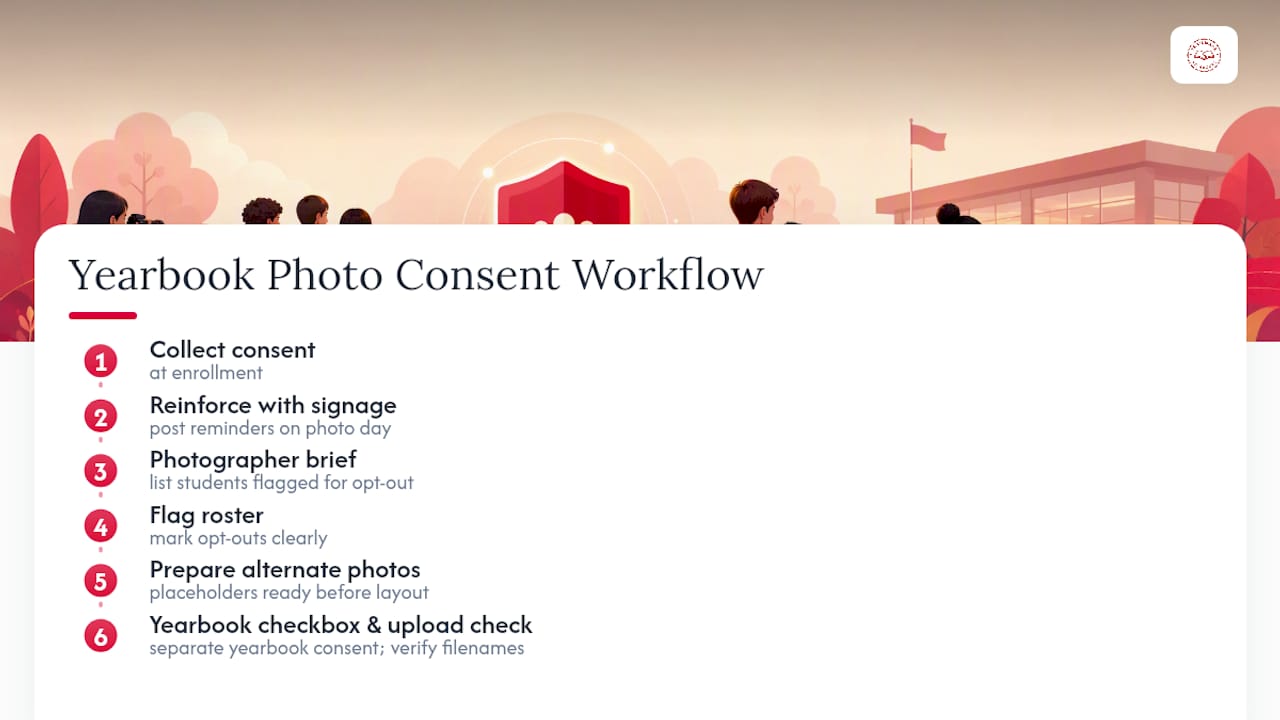
Yearbook production runs into consent problems in predictable spots, so build your workflow around them. Collect consent at enrollment, then reinforce it with signage at photo day so families see the reminder twice. Give your photographer a short written brief listing any students flagged for opt-out, so those images never make it into the working files in the first place.
On the roster side, flag opt-out students clearly and prepare a placeholder or alternate photo before layout begins, not after, using tools like the Kudoflix Video Editor for Schools and Parents to manage and compile photos responsibly. Yearbook use deserves its own checkbox separate from general marketing consent, since a parent might approve website photos but not the permanent yearbook. Consistent file naming and an upload checklist tied to your consent list catch mismatches before they turn into a reprint.
Why Clean Consent Records Make Better Yearbooks
Every yearbook adviser I've talked to has a story about a photo pulled at the last minute because nobody could confirm consent. Clear, well-organized forms don't just protect the district legally. They protect your production schedule. When opt-outs are flagged on the roster from day one instead of discovered during layout week, deadlines stop feeling like a scramble.
— Jace
How TrailMark Yearbooks Supports Cleaner Photo Workflows
Once your consent forms are signed and your roster is flagged, the harder problem is turning hundreds of photos into a finished book without missing an opt-out or blowing a deadline. That's the gap Trailmarkyearbooks closes for schools that don't have a dedicated design team on staff.

Yearbook services offer instant, all-inclusive pricing with no sales calls and no hidden fees, plus a 2 to 3 week turnaround that gives advisers room to fix a flagged photo late without blowing the whole schedule. Design help is included, whether your team works in Canva, Adobe InDesign, or an online creator, and there is no fixed order deadline forcing you to lock pages before every consent issue is resolved. If you're staring at a roster full of opt-out flags and a shrinking timeline, request a free sample yearbook to see how the production process handles it, or check current pricing and turnaround options for your school.
Sources
- When is a photo or video of a student an education record under FERPA? | Student Privacy Policy Office
- Media Consent Forms | NYC Department of Education InfoHub
- Consent form to permit district to use student photographs/images/schoolwork | SFUSD
- Plain-language communication research (PMC)